

The Meta Quest Touch Pro controllers aim to lift your VR sessions by adding more precise finger tracking, better haptics, and a native rechargeable battery. If you care about aiming, hand gestures and immersion, these controllers can change how you play on Quest headsets. In this review you’ll learn what makes the Touch Pro different from stock controllers, where they genuinely improve your experience, and the practical trade-offs you should consider before upgrading.
TL;DR
|
Feature |
Verdict |
|---|---|
|
Ease of Use |
⭐️⭐️⭐️⭐️ ⏱️ – Pairing and daily use are straightforward once set up, though you may hit occasional reconnection or gesture glitches. |
|
Tracking |
⭐️⭐️⭐️ 🎯 – Finger and off-camera tracking feel more precise for many games, but some users report intermittent tracking freezes or gesture misreads. |
|
Comfort & Build |
⭐️⭐️⭐️⭐️ 🎮 – Well-balanced design and solid materials make longer sessions easier on your hands. |
|
Battery & Charging |
⭐️⭐️⭐️ 🔋 – Native rechargeable cells and a compact charging cradle are convenient, though battery life is roughly 8–9 hours and the cradle can be fiddly to use. |
|
Compatibility & Value |
⭐️⭐️⭐️ ⚠️ – A meaningful upgrade for many Quest users, especially if you want finer input, but inconsistent firmware and tracking reports mean results can vary by headset and setup. |
Meta Quest Touch Pro Controllers

If you want Controllers that bring finger-level precision and stronger haptics to your Meta headset, these Pro controls change how close-to-real VR can feel. You get self-tracking cameras that expand your movement range, TruTouch haptics for localized feedback, and built-in rechargeable batteries with a compact charging dock.
In daily use they make aiming, pinches, and small interactions feel noticeably smoother — handy for everything from Beat Saber or FPS aiming to drawing or writing. For social VR and long sessions, the improved tracking and gesture fidelity mean fewer awkward freezes and more natural expression.
They pair best with Meta Quest 2 and Quest Pro headsets, and some Quest 3 users report great results while others see glitches, so be ready for a bit of variability depending on your setup. If you care about precision and immersion, these Controllers are a clear step up from standard controllers and worth considering as a Pro-level upgrade to your VR kit.
Pros and Cons
|
Pros |
Cons |
|---|---|
|
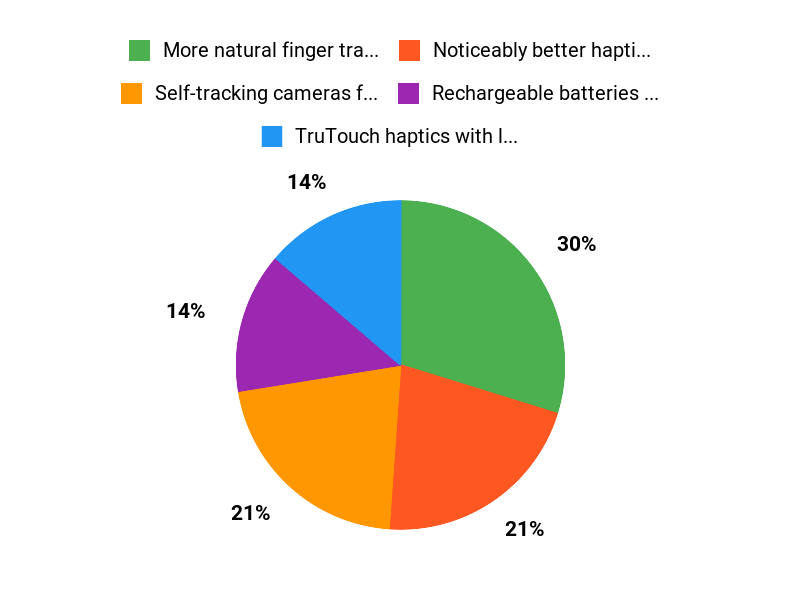
✅ More natural finger tracking and precise pinch gestures |
❌ Some users report tracking freezes or gesture ‘stuck’ issues |
|
✅ Noticeably better haptics and in-hand balance |
❌ Charge cradle can be fiddly and is small |
|
✅ Rechargeable batteries and compact charging dock |
❌ Mixed compatibility experience across Quest models |
|
✅ Improved off-camera accuracy for wider play areas |
❌ Battery life and heat warnings noted by a few users |
What People Say
Users praise the improved tracking, haptics and the convenience of rechargeable Controllers, especially for precision tasks and social VR. Others report occasional tracking glitches or pairing issues on certain headsets.
Overall Sentiment: Mixed

🗣️ zapoqx
The native rechargeable battery and compact recharge cradle are convenient, and the off-camera accuracy really helps with things like back-play. I didn’t have to worry about lighting for full functionality and overall they ran great with my Quest 2.
🗣️ Sebastian
With my Quest 3 I never lose tracking and they don’t go into sleep mode. They feel high quality, improve tracking in games like VRChat and Beat Saber, and make the experience more immersive even if they’re a bit heavier.
Situational Benefits
|
Situation |
How It Helps |
|---|---|
|
Competitive rhythm games |
You get tighter tracking and faster response for precise swings and small adjustments, which helps with accuracy in games like Beat Saber. |
|
Social VR and emote-heavy apps |
Finger-level gestures translate more reliably so your expressions and hand motions look more natural to others. |
|
Room-scale movement |
Self-tracking cameras reduce dependency on headset lighting, letting you move and aim without losing tracking as often. |
|
Creative tasks (drawing, writing) |
Fine motor controls and a stylus tip make small, detailed inputs feel accurate enough for sketching or note-taking in VR. |
Ease of Use
|
Feature |
Ease Level |
|---|---|
|
Setup |
Moderate |
|
Daily pairing |
Easy to Moderate |
|
Charging with dock |
Easy, but dock placement is fiddly |
|
Firmware updates |
Moderate |
Versatility
Useful across many VR genres — from rhythm and shooters to social and creative apps — though compatibility experience varies by headset.
Aesthetic
Clean, modern Meta finish with an in-hand form that feels balanced and less obtrusive than ringed controllers.
Innovation
Brings self-tracking cameras and TruTouch haptics into a compact, in-hand design for better gesture fidelity and localized feedback.
Fun Factor
High when tracking is stable — haptics and finger tracking make interactions feel more immersive and satisfying.
Key Benefits
- Self-tracking cameras for wider, more reliable motion
- TruTouch haptics with localized feedback
- Fine finger and pinch controls for precise interaction
- Built-in rechargeable batteries with compact charging dock
Rating: 3.7 (total: 865+)
FAQ
Are the Meta Quest Touch Pro Controllers Compatible With My Headset?
You can use the Meta Quest Touch Pro Controllers with a range of Meta headsets, including Quest 2, Quest 3 and Quest Pro, but performance can vary by headset and firmware. You should make sure your headset and controllers are running the latest updates because compatibility and firmware updates often resolve tracking quirks and gesture accuracy. If you plan to use them for PC VR, you can connect through Link or Air Link, though some games may need input remapping for full finger-tracking features. Be aware that switching controllers may require removing or re-pairing your old controllers, so give yourself a few minutes to set things up.
How Is Tracking, Battery Life, And Comfort During Long Sessions?
You should expect improved hand and finger responsiveness thanks to the Pro design, with many users reporting noticeably better aiming and fine movement control thanks to precision tracking, but some players still experience intermittent gesture or tracking dropouts depending on room layout and software state. The controllers use built-in lithium-ion batteries that typically last around eight to nine hours in real-world play, and they include a small recharge cradle that requires proper alignment to charge reliably.
The Pro controllers feel a bit heavier than classic Quest controllers but are balanced differently so many people find them more comfortable for long sessions; try using knuckle-style grips for throwing or fast-action titles if you want a more secure feel.
What Troubleshooting Steps And Practical Tips Should You Use If You Experience Issues?
You should first check for and install any headset or controller firmware updates, then try a full power cycle of both headset and controllers if you see frozen gestures or lost tracking. Re-pairing the controllers can clear persistent state issues, and recalibrating or toggling hand-tracking settings helps with misdetected gestures.
Make sure nothing is blocking your headset cameras, avoid reflective or very dark surfaces, place the small charge cradle on a stable surface to ensure good contact, and close background apps that might push the headset thermals. If you still have recurring problems after these steps, contact Meta support because some issues have been addressed through official updates and targeted fixes.
Why Choose Touch Pro
You choose the Touch Pro because they deliver noticeably sharper tracking and richer haptics that make aiming, grabbing, and interacting feel more precise and immersive. Their comfortable ergonomics and responsive controls let you stay in the game longer and focus on playing, not fighting the hardware.
Wrapping Up
The Meta Quest Touch Pro controllers deliver noticeably improved hand fidelity and a more immersive feel for many VR titles, especially where finger tracking and nuanced gestures matter. You get comfortable ergonomics and the convenience of built-in rechargeable batteries, but you should factor in reports of occasional tracking quirks and the need for firmware maturity.
If you value precision and upgraded input on your Quest experience, these controllers are worth considering — just be prepared for variable reliability depending on your headset and play environment.
This Roundup is reader-supported. When you click through links we may earn a referral commission on qualifying purchases.

