

You probably want controllers that feel natural, track reliably, and don’t hold you back from enjoying VR. This comparison looks at the Meta Quest Touch Pro controllers and the Official Touch Plus replacement controllers for Quest 3 / 3s so you can decide which one fits your needs and budget.
In short, you’ll learn the trade-offs between premium tracking and built-in rechargeable batteries versus affordable, official-style replacements that pair quickly — and which choice makes the most sense for how you play.
Top Picks
|
Category |
Product |
Score |
|---|---|---|
|
🏆 Best Overall |
82/100 |
|
|
🎯 Best for Quest 3 |
Official Left Hand Controller Touch Plus for Meta Quest 3 / 3s |
78/100 |
|
💰 Best Value (Right Replacement) |
Official Right Hand Controller Touch Plus for Meta Quest 3 / 3s |
75/100 |
How We Picked
You want controllers that are accurate, comfortable, and reliable. We focused on compatibility with Quest headsets (especially Quest 3), tracking performance and real-world user feedback, battery type and runtime, build quality and ergonomics, price vs.
value, and how easy each controller is to pair and maintain. We also weighed verified customer reviews and common failure modes (drift, connection issues, battery life), so you can see practical trade-offs instead of just specs.
Meta Quest Touch Pro Controllers
If you’re trying to decide whether the Meta Quest Touch Pro controllers are the Right upgrade, think of them as a big step toward natural-feeling hand presence in VR. You get self-tracking cameras, localized TruTouch haptics, and finer motion controls that make aiming, grabbing and small, precise movements feel more believable.
In daily use they’re great for longer sessions where precise input matters — beat saber, shooters, VRChat emoting and creative apps where a stylus tip and pinch motions help. For special occasions like streaming a session or playing with friends, the improved haptics and in-hand balance make gestures and cutscenes feel more immersive. A few users with Quest 3s report flawless tracking and no sleep-mode interruptions, while others on different headsets see occasional quirks — so whether they’re Right for you depends on how much you value finer control and built-in recharge over swapping AAs.
Overall, if you want more tactile feedback and finer hand control, these controllers are worth a close look.
Pros and Cons
|
Pros |
Cons |
|---|---|
|
✅ Improved tracking and gesture fidelity with self-tracking cameras |
❌ Some users experience tracking drops or gesture-stuck bugs on certain headsets |
|
✅ Localized haptics that add realism to interactions |
❌ Charging dock is small and placement can be fiddly |
|
✅ Built-in rechargeable batteries and charging dock |
❌ Built-in batteries limit long-term replaceability |
|
✅ Neat in-hand form that allows closer-to-face movement |
❌ Occasional heat/sleep-mode alerts reported by a few users |
What People Say
People say these controllers bring a noticeably more natural, tactile feeling to VR — great for precision play and social apps — but a minority report tracking or disconnection issues on some setups.
Overall Sentiment: Mixed

🗣️ zapoqx
The controller runs smoothly and removes lighting worries thanks to self-tracking cameras. Rechargeable batteries and a compact charging cradle are handy; tracking feels reliable and off-camera accuracy is better for back-play.
🗣️ Sebastian
From a Quest 3 user: tracking was flawless, controllers felt high quality, never went into sleep mode and finger tracking worked well across VRChat and many games. Made gaming more immersive and fluid.
Situational Benefits
|
Situation |
How It Helps |
|---|---|
|
Competitive rhythm games |
Centered weight and precise motion sensors make swings and timing feel snappier and more predictable, especially when you add knuckle grips. |
|
Social VR (VRChat, emotes) |
Finger tracking and reliable gestures let you emote naturally without relying on hand-tracking, which keeps interactions fluid. |
|
Creative work (drawing, writing) |
Pinch motion and stylus tip give you finer control for sketching, selecting tiny UI elements, and detailed manipulation. |
|
Long play sessions |
Rechargeable batteries and balanced in-hand design reduce the hassle of swapping AAs and can feel more comfortable over time. |
Ease Of Use
|
Feature |
Ease Level |
|---|---|
|
Setup and pairing |
Moderate |
|
Charging and battery management |
Easy |
|
Gesture learning curve |
Moderate |
|
Daily use (grip and comfort) |
Easy |
Versatility
High — works well for rhythm games, shooters, social VR, and creative apps thanks to pinch, stylus tip and joystick control.
Comfort
Generally comfortable with weight centered in the palm; some players find them heavier but better balanced for long sessions.
Problem Solving
Good at removing lighting-based tracking problems thanks to onboard cameras, but not a universal fix — occasional firmware or compatibility glitches can still occur.
Fun Factor
High — enhanced haptics and better hand presence make interactions feel more tactile and engaging in most games.
Key Benefits
- Self-tracking cameras for wider motion and fewer light-related issues
- TruTouch haptics for localized feedback on triggers and thumbs
- Rechargeable batteries with a compact charging dock
- Fine motor controls (pinch, stylus tip, joystick) for detailed work
Rating: 3.7 (total: 865+)
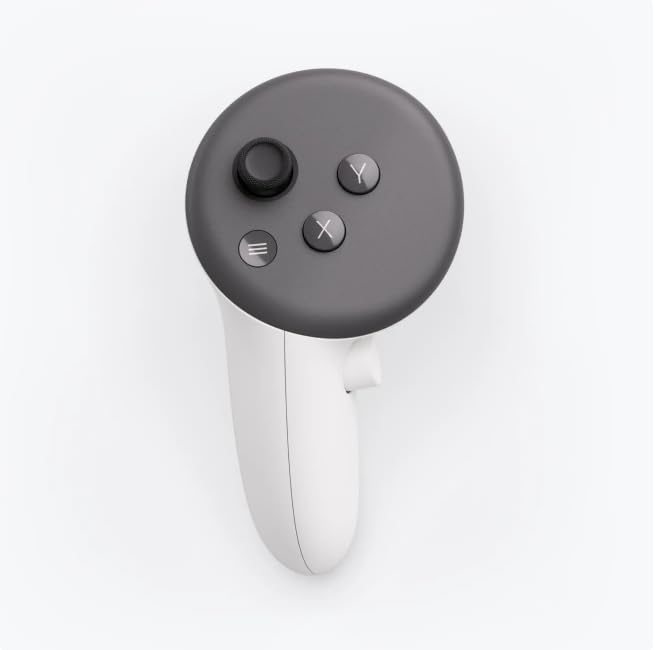
Official Left Touch Plus Controller
If you need a straight-up replacement for a worn or missing left controller, this Official Left Touch Plus from Meta is the simplest fix. It gives you the familiar hand-shaped layout you’re used to — comfortable button placement, a thumbstick, capacitive thumbrest and two-stage trigger — plus upgraded haptics that make interactions feel a bit more alive in mixed reality. In daily use it’s great for normal play: shooters, rhythm games and the usual Quest 3 library where comfortable grip and reliable input matter. For special moments like showing VR to friends or demoing a mixed-reality app, the solid build and quick pairing take the friction out of setup.
You should know this listing is for the left controller only, but if you just want the left Hand to match the rest of your setup, it’s an easy, practical choice.
Pros and Cons
|
Pros |
Cons |
|---|---|
|
✅ Genuine-style replacement that matches Quest 3 / 3S controls |
❌ Reports of stick drift and occasional tracking loss from a few users |
|
✅ Comfortable, familiar Hand-oriented layout |
❌ This listing is for the left controller only |
|
✅ Improved haptics make interactions feel more immersive |
❌ Uses replaceable batteries (may need swapping over time) |
|
✅ Includes wrist strap for added safety |
What People Say
People find it a reliable, like-for-like left Touch Plus replacement — comfortable to hold, pairs quickly and arrives in good condition. A small number report stick drift or tracking quirks after long use.
Overall Sentiment: Positive

🗣️ Rex Mock
Perfect replacement. Easy pairing.
🗣️ Alexis De Jesus
Excelente vendedor, perfectas condiciones, nuevo
Situational Benefits
|
Situation |
How It Helps |
|---|---|
|
Replacing a broken controller |
Gets your setup back to full functionality quickly — same button layout and pairing steps as the original, so you don’t have to relearn controls. |
|
Casual and party gaming |
Comfortable grip and snappy haptics keep games feeling responsive when you’re showing VR to friends or jumping between titles. |
|
Mixed reality demos |
Advanced haptics and precise input make object interactions feel more convincing when you’re demoing spatial features. |
|
Long play sessions |
Ergonomic design and a secure wrist strap reduce hand fatigue and the risk of accidental throws during active play. |
Ease Of Use
|
Feature |
Ease Level |
|---|---|
|
Setup and pairing |
Easy |
|
Hand controls and buttons |
Easy |
|
Battery replacement |
Moderate |
|
Wrist strap adjustment |
Easy |
Versatility
Solid — works well across the typical Quest 3 range: shooters, rhythm titles, social apps and mixed-reality demos where a reliable left Hand controller is needed.
Comfort
Comfortable for extended sessions thanks to an ergonomic layout; feels familiar if you’re used to the standard Quest Touch design.
Problem Solving
Moderate — it restores full left-side input and reduces interruption from a missing controller, but it won’t fix hardware issues like stick drift or headset-tracking quirks.
Fun Factor
High — the improved haptics and natural Hand placement help games feel more engaging and responsive.
Key Benefits
- Ergonomic button and thumbstick layout for natural Hand placement
- Advanced haptics for more tactile feedback in mixed reality
- Secure wrist strap included to prevent drops during active play
- Quick pairing with Quest 3 / 3S for fast setup
Rating: 4.5 (total: 25+)
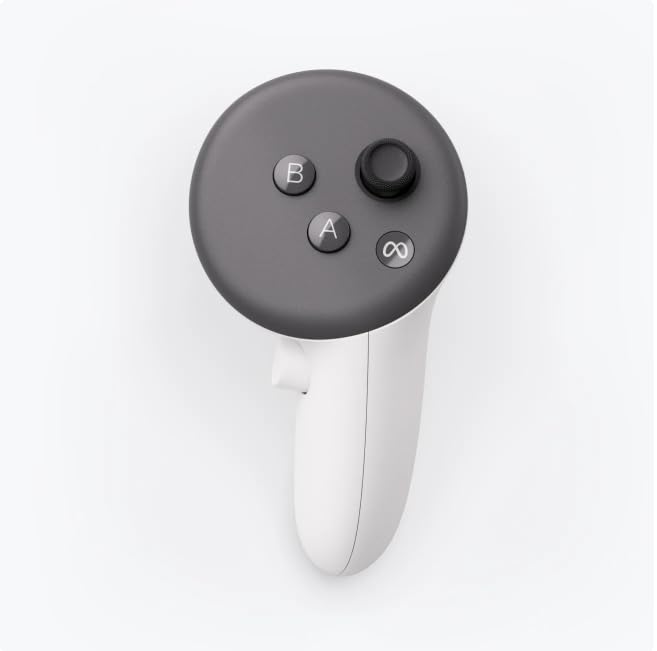
Official Right Touch Plus Controller
If one of your controllers quit or you just need a matching right Hand replacement, this Official Right Touch Plus is the straightforward fix. It keeps the same comfortable button layout you expect — thumbstick, capacitive thumbrest, A/B/X/Y buttons and a two-stage trigger — plus upgraded haptics that make interactions feel more tactile in mixed reality.
In everyday use it’s great for shooters, rhythm games and social VR, and it pairs quickly so you can get back to playing without fuss. For demoing VR to friends or trying mixed-reality apps, the familiar controls and solid build make setup painless. If you want something that just works like the original right Hand controller, this is an easy, practical choice.
Pros and Cons
|
Pros |
Cons |
|---|---|
|
✅ Matches the stock Quest 3 / 3S control scheme |
❌ A few users report stick drift or tracking issues |
|
✅ Comfortable right Hand-oriented ergonomics |
❌ Listing is for the right controller only |
|
✅ Improved haptics make interactions more engaging |
❌ Uses replaceable batteries (you’ll need spares over time) |
|
✅ Comes with wrist strap for added security |
What People Say
You’ll hear that it pairs quickly and feels like the original right controller, though a minority report stick drift or short-lived failures after some use.
Overall Sentiment: Positive

🗣️ Mr Deep sea
Works great — easy to connect; I followed a guide for the Oculus 3 controller and pairing was simple.
🗣️ Scott Helm
Connected easily and worked reliably during play sessions.
Situational Benefits
|
Situation |
How It Helps |
|---|---|
|
Replacing a broken controller |
Gets your setup back to full functionality quickly with the same button layout and pairing steps as the original, so you don’t have to relearn controls. |
|
Casual and party gaming |
Comfortable grip and responsive haptics keep games feeling snappy when you’re swapping players or showing VR to friends. |
|
Mixed reality demos |
Precise inputs and tactile feedback make object interactions feel more convincing during demos. |
|
Long play sessions |
Ergonomic design and a secure wrist strap reduce hand fatigue and lower the chance of accidental drops. |
Ease Of Use
|
Feature |
Ease Level |
|---|---|
|
Setup and pairing |
Easy |
|
Right Hand controls and buttons |
Easy |
|
Battery replacement |
Moderate |
|
Wrist strap adjustment |
Easy |
Versatility
Solid — works across the usual Quest 3 library: shooters, rhythm titles, social apps and mixed-reality experiences where a reliable right Hand input is needed.
Comfort
Comfortable for extended sessions thanks to an ergonomic shape and familiar button spacing; feels natural if you’re used to stock Touch controls.
Problem Solving
Moderate — it restores full right-side input and reduces downtime from a missing controller, but it won’t fix inherent hardware defects like stick drift in a specific unit.
Fun Factor
High — the improved haptics and natural Hand placement make games and mixed-reality interactions more immersive.
Key Benefits
- Genuine-style replacement that matches your Quest 3 / 3S controls
- Ergonomic right Hand layout for natural grip and button reach
- Advanced haptics for more tactile feedback in mixed reality
- Includes wrist strap so you don’t worry about accidental drops
Rating: 4.0 (total: 20+)
FAQ
Which Controller Is Best For Meta Quest 3 Or 3s?
You should pick based on what you value most: the Meta Quest Touch Pro controllers bring inside-out finger tracking, native rechargeable batteries, and better off-camera accuracy, which makes them ideal if you want more natural hand presence for PCVR and social apps. The Official Right Hand Controller Touch Plus for Meta Quest 3 / 3s and its Left counterpart are genuine-style replacements that prioritize simple, reliable input, replaceable batteries, and quick pairing with your Quest 3 or 3s.
If you mainly play casual titles and want a straightforward swap for a damaged Right or Left Touch Plus, go with the Official Touch Plus; if you want advanced hand tracking and tighter aiming for competitive or immersive experiences, the Touch Pro is the one to consider.
Will Touch Pro Controllers Fix Tracking Issues In VRChat And Other Games?
You might see real improvements in many cases because the Touch Pro controllers use more sensors and can reduce dependence on headset camera angle and lighting, which helps in VRChat, FPS aiming, and tactile interactions. That said, some users report occasional gesture misrecognition, freezes, or disconnects, so they are not a cure-all.
Keep your headset and controller firmware updated, restart controllers if they freeze, and use knuckle or wrist straps for throwing-based games. If consistent, flawless tracking is mission-critical for you, test with your headset (Quest 3 or 3s) before committing and be prepared to troubleshoot firmware and connection quirks.
Can You Use Official Touch Plus Controllers As Replacements And How Do You Pair Them?
Yes, you can use the Official Touch Plus controllers as direct replacements; there are listings for a Left and a Right Hand Controller specifically made for Meta Quest 3 / 3s. To pair, power on your Quest 3 or 3s, open Settings, go to Devices, choose Pair New Controller, then select the correct side (Left or Right) and follow the on-screen prompts.
If pairing fails, remove any old controllers from the device list, replace batteries if applicable, bring the controller close to the headset, and reboot both headset and controller. Using the correct side (Right vs Left) and following the on-screen pairing steps usually fixes most connection problems.
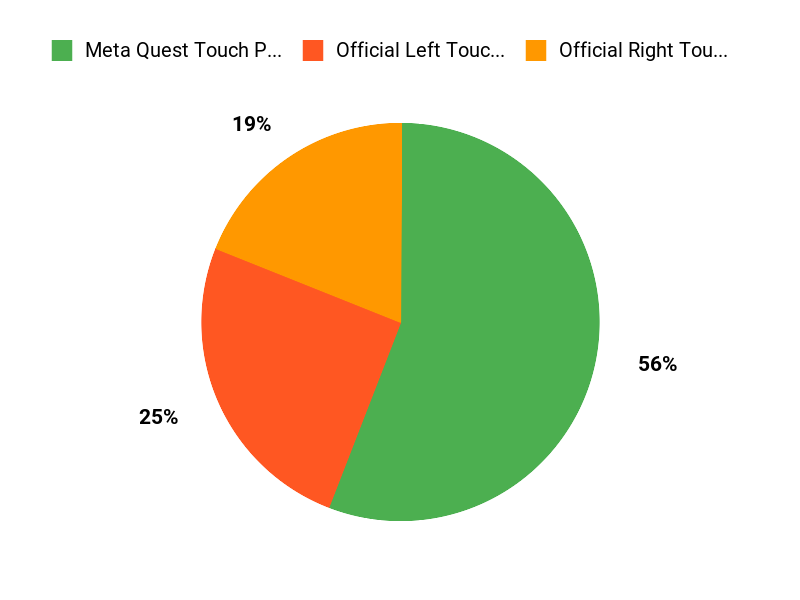
What Buyers Prefer
When choosing between the Meta Quest Touch Pro controllers and the Official Left/Right Touch Plus controllers, you typically weigh immersion and precision — like superior tracking, richer haptics, and extra sensors — against price, battery life, and comfort. If you want the most accurate, high-end experience you go Pro, but if you value affordability, simple comfort, or just replacing a single side you pick the Touch Plus left or right controllers.
Wrapping Up
To decide, think about how you use VR. If you want a feature-rich, rechargeable controller with advanced tracking and better haptics, the Meta Quest Touch Pro Controllers are the stronger overall package at $249.99, but they come with mixed reviews around connectivity and occasional tracking quirks.
If you only need a replacement for a single side on a Quest 3 / 3s, the Official Touch Plus Left and Right controllers at $139.99 each give you an easy-to-pair, ergonomic option that keeps your setup working without a full upgrade. Choose the Pro if you prioritize precision and built-in batteries; choose the Official Touch Plus controllers if you want a straightforward, headset-specific replacement that’s simpler and more affordable.
| Meta Quest Touch Pro Controllers | Official Left Hand Controller Touch Plus for Meta Quest 3 / 3s | Official Right Hand Controller Touch Plus for Meta Quest 3 / 3s | |
|---|---|---|---|
 |
 |
 |
|
| Rating | 3.7/5 (865 reviews) | 4.5/5 (25 reviews) | 4.0/5 (20 reviews) |
| Compatibility | Quest 2, Quest Pro, Quest 3 | Quest 3, Quest 3S (Left controller) | Quest 3, Quest 3S (Right controller) |
| Battery Type | 2 Lithium Ion batteries (included) | Replaceable batteries required (not included) | Replaceable batteries required (not included) |
| Haptic Feedback | Advanced haptics, provides immersive feedback | Enhanced vibration feedback for realistic interactions | Advanced haptics for immersive experiences |
| See Pricing | See Pricing | See Pricing |
This Roundup is reader-supported. When you click through links we may earn a referral commission on qualifying purchases.

