

You want an easy, affordable way to step into virtual reality without tangling cables or buying a gaming PC. The Meta Quest 2 delivers that promise by combining an intuitive setup, wireless tracking and a large app library into a single, portable headset. In this review you’ll learn why the Quest 2 remains a smart pick for beginners in 2025, how it can expand your gaming, fitness and social experiences, and what trade-offs to expect from an all-in-one device.
Key benefits include all-in-one freedom, simple setup, and a strong catalog of immersive experiences that make VR useful and fun for everyday use.
TL;DR
|
Feature |
Verdict |
|---|---|
|
Ease of Use |
⭐️⭐️⭐️⭐️⭐️ – ⏱️ Super simple setup and controls, great for newcomers |
|
Performance |
⭐️⭐️⭐️⭐️ – 🔍 Smooth, immersive graphics and tracking for standalone VR |
|
Comfort |
⭐️⭐️⭐️⭐️ – 🎯 Lightweight and wearable, but strap and fit could be better for long sessions |
|
Content Library |
⭐️⭐️⭐️⭐️ – 📚 Wide range of games, fitness and experiences; some premium titles are store-exclusive |
|
Overall Verdict |
⭐️⭐️⭐️⭐️⭐️ – 💸 Best entry-level all-in-one headset if you want straightforward, wireless VR |
Meta Quest 2

If you want a simple, portable way to try modern VR, the Meta Quest 2 makes it easy. You just put the headset on, set a play boundary, and jump into games, fitness sessions, social hangouts or immersive experiences without a PC or console.
It’s light enough for longer sessions, has accurate tracking for motion-based games, and supports hand tracking and screen-casting to share what you’re doing. Use it for daily short workouts, winding-down VR nature walks, or multi-player nights with friends. For special occasions, it’s great for showing family a roller-coaster demo, hosting a virtual movie night, or trying creative museum tours.
If you want something approachable that still feels convincing, Quest 2 is a reliable entry point that won’t overcomplicate setup or use.
Pros and Cons
|
Pros |
Cons |
|---|---|
|
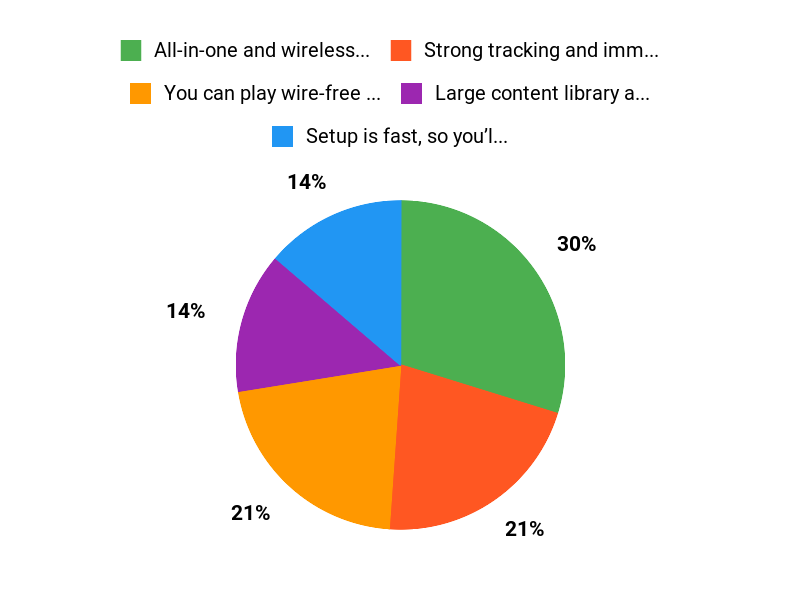
✅ All-in-one and wireless — no extra hardware required |
❌ Display blacks and fine detail can look gray or slightly pixelated |
|
✅ Strong tracking and immersive audio |
❌ Battery life is limited for long sessions |
|
✅ Large content library across genres |
❌ Stock strap may feel uncomfortable for extended wear |
What People Say
People say Quest 2 is immersive and approachable — you’ll get convincing graphics and solid tracking out of the box, plus modes that reduce motion sickness for many users.
Overall Sentiment: Positive

🗣️ Eugene W. Maloney
A long-time user described Beat Saber as a genuinely immersive, body-moving experience — you’ll lose track of the room, get a real workout from dodging and ducking, and the system’s boundary alerts help keep you from knocking over furniture.
🗣️ S BAINBRIDGE
Another detailed reviewer said they suffered no motion sickness thanks to adjustable movement speed and a sitting mode, and loved nature and travel apps like Nature Trek and TRIPP for calming, immersive experiences.
Situational Benefits
|
Situation |
How It Helps |
|---|---|
|
Daily Workout |
You can use fitness-focused titles and motion tracking to get a short, intense workout without leaving the living room. |
|
Family Demo Night |
Cast your view to a TV or phone so everyone can watch while you try a roller-coaster or Beat Saber demo. |
|
Calm Evenings |
Apps like Nature Trek and TRIPP offer relaxing, 3D environments for winding down before bed. |
|
Travel or On-the-Go |
No cables or PC mean you can pack the headset and play at a friend’s place or while traveling. |
Ease Of Use
|
Feature |
Ease Level |
|---|---|
|
Setup |
Easy |
|
Controller Tracking |
Easy |
|
Account & App Management |
Moderate |
|
Casting to TV/Phone |
Moderate |
Versatility
You’ll find games, fitness, social hangouts and calming experiences — it handles daily play sessions and one-off demos equally well.
Comfort
Comfort is generally good for short to medium sessions, but many users swap the stock strap for a cushioned alternative when they plan longer playtimes.
Problem Solving
It solves the ‘how do I try VR without a PC’ problem — you get standalone VR with good tracking and easy setup for most use cases.
Fun Factor
High — motion games like Beat Saber are engaging and physically active, while exploration and social apps deliver varied, repeatable fun.
Key Benefits
- You can play wire-free — no PC or console needed.
- Setup is fast, so you’ll be in VR within minutes.
- Hand tracking and accurate motion make interactions feel natural.
- Great library for gaming, fitness, social and calming experiences.
- Portable design so you can take VR to a friend’s place or travel.
Rating: 4.7 out of 5 (total: 77,741+)
FAQ
Is Meta Quest 2 Still the Best Entry-Level VR Headset in 2025?
You can still call the Meta Quest 2 one of the best entry-level options because it gives you standalone freedom without needing a PC or console, reliable inside-out tracking, hand tracking, and a large content library that keeps growing. Expect clear, immersive experiences for gaming, fitness, and media, though the display is not OLED and you may notice pixelation compared with newer flagship models. Battery life is typically around two hours depending on what you run, and the default strap can feel basic over long sessions.
Know that some advanced PC VR titles work well when you connect via Air Link or an Oculus Link cable, but you will need a capable PC or a strong 5 GHz network for wireless streaming. Overall, if you want an easy-to-use, versatile headset that introduces you to VR with minimal setup, the Quest 2 still hits the sweet spot.
How Do You Set Up the Quest 2, Connect It to a PC, and Manage Storage?
You set up the Quest 2 by charging it, installing the Meta (Oculus) mobile app, creating or signing into your Meta account, and following the in‑headset prompts to configure Wi‑Fi, guardian boundaries, and privacy settings. To play PC VR titles you can use Air Link for wireless streaming or Oculus Link with a USB‑C cable; wireless works best with a dedicated 5 GHz router and a good home network while wired gives the most consistent performance.
The 128 GB model holds many games and apps but you can run out of space if you install large PC‑quality experiences, so manage storage by uninstalling titles you rarely use and relying on cloud saves where available. If you want more advanced sideloading or indie content, explore SideQuest but be mindful of compatibility and security.
Practical tip: keep firmware updated and use the included glass spacer or prescription lens inserts to avoid discomfort and reduce the need to remove the headset to adjust vision.
Will You Experience Motion Sickness, Eye Strain, or Other Safety Issues and How Can You Reduce Them?
Some people get motion sickness or eye strain, but you can dramatically reduce both by adjusting comfort settings, using snap or teleport locomotion, choosing lower movement speeds, and spending short sessions to build tolerance. Make sure the headset fits snugly, set the correct IPD, and use the included glass spacer or prescription lens inserts if you wear glasses.
Always define and clear a play area before starting and use the guardian boundary and casting to a TV or phone so someone can guide you while you learn. Take breaks every 20 to 30 minutes if you feel any discomfort, avoid playing while overly tired, and stop if you feel dizzy or nauseous. For kids, follow Meta’s child safety guidance online and note that accounts are intended for ages 10 and up. Finally, if heat or battery life concerns limit your sessions, try a comfort strap with an external battery pack or shorter, more frequent sessions to keep experiences enjoyable and safe.
Why Buyers Choose Quest 2
You pick the Quest 2 because it delivers the best balance of price, ease-of-use, and performance: it’s a standalone, wireless headset that’s simple to set up and offers sharp visuals and reliable tracking. You also get a huge library of games and apps, hand-tracking and controller support, plus optional PC Link for more demanding titles, so it’s the most practical entry-level choice in 2025.
Wrapping Up
The Meta Quest 2 remains one of the most approachable ways for you to enter VR. It combines wireless freedom, reliable tracking and a broad content library into a compact package that works out of the box.
Expect excellent ease of use and a strong ecosystem for gaming, fitness and social apps; expect compromises in display blacks, battery life (about a few hours depending on use) and the basic strap comfort. If you want a straightforward, capable standalone headset that gets you into virtual worlds quickly and with minimal fuss, the Quest 2 is still a top choice in 2025.
Some Roundups users participate in affiliate programs including the Amazon Services LLC Associates Program, or Impact, affiliate advertising programs designed to provide a means for creators to earn fees by linking to websites. Participating users may earn a referral commission from qualifying purchases.

