

GOOVIS G3 Max is positioned as a personal cinema headset that brings a high-resolution OLED display and 3D playback to a compact, wearable form. If you value privacy, portability, and an immersive screen experience without a large TV, this kind of device can change how you watch movies, play games, or work on the go.
In this review you’ll learn what makes the G3 Max stand out, what trade-offs you should expect, and whether it suits the way you want to use a personal cinematic headset.
TL;DR
|
Feature |
Verdict |
|---|---|
|
⭐️⭐️⭐️ – Ease of Use |
Straightforward wired setup but achieving a perfect face fit can take fiddling ⏱️ |
|
⭐️⭐️⭐️⭐️ – Image Quality |
OLED panels and high resolution deliver deep blacks and detailed images for movies and gaming 🎨 |
|
⭐️⭐ – Comfort |
Core unit is relatively light, but fit, pressure points, and missing strap options create mixed comfort reports 🔍 |
|
⭐️⭐️⭐️ – Features & Compatibility |
3D support, built-in speakers and HDMI/USB‑C wired options work with consoles, PCs and handhelds 🔌 |
|
⭐️⭐ – Support & Reliability |
Some users report hardware failures and uneven customer support; quality control appears inconsistent 💸 |
GOOVIS G3 Max

If you like the idea of a personal theater that you can carry around, the GOOVIS G3 Max is one of the more convincing attempts. You get dual micro OLED panels (2.5K each), a 65° field of view and support for HDMI and Type-C, so hooking it up to a Steam Deck, Switch, PS5, Xbox or a phone is straightforward. In practice that means crisp pictures, deep blacks and a very cinematic feel when you stream movies or play games. It’s genuinely handy for late-night gaming or watching 3D content from Plex when you don’t want to disturb anyone.
That said, there are two things you should know before committing. First, fit varies by face shape — some people need extra pressure or a head mount to get the displays close enough for full immersion.
Second, a handful of users report weight and customer-support issues, so factor in potential setup quirks and after-sales patience. If you’re the sort who values picture quality and portability over a perfect, universal fit, you’ll probably enjoy it. If you want something that just works for everyone right out of the box, this might require a little tweaking.
Pros and Cons
|
Pros |
Cons |
|---|---|
|
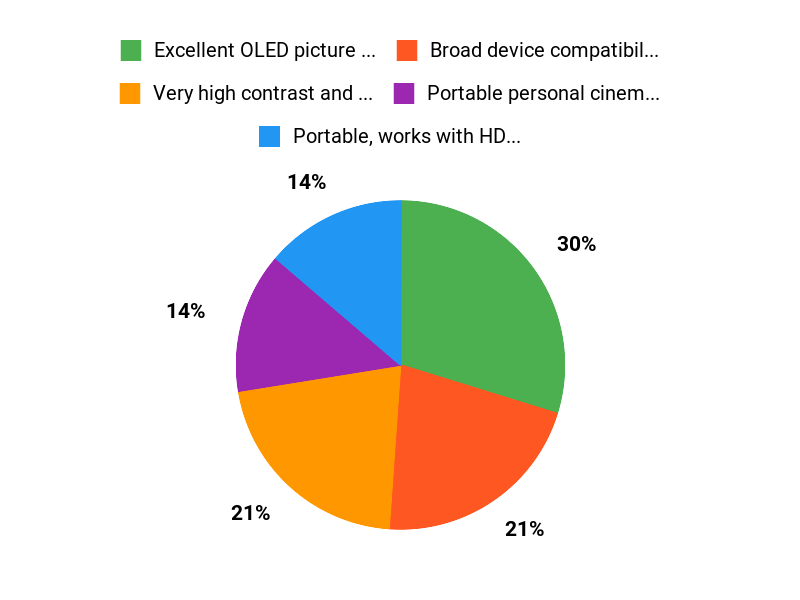
✅ Excellent OLED picture quality and contrast |
❌ Fit can be hit-or-miss — some users need extra pressure or a mount for full immersion |
|
✅ Broad device compatibility via HDMI and Type-C |
❌ Some reports of heavier-than-expected weight and missing accessories out of the box |
|
✅ Portable personal cinema ideal for travel or late-night use |
❌ Customer support experiences are inconsistent |
|
✅ Built-in speakers and support for 3D content |
What People Say
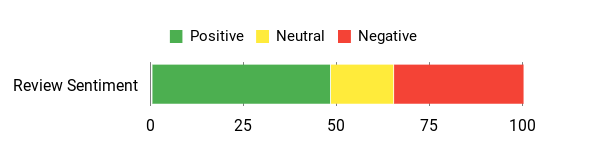
People praise the image quality and portability — gamers and Plex users repeatedly mention stunning visuals and low lag. At the same time, several owners note fit and weight issues and mixed experiences with support, so expect to tinker a bit to get a perfect setup.
Overall Sentiment: Mixed
🗣️ Luke
I pair it with an Xbox and it transformed gaming and movie watching. The 2.5K panels and OLED tech deliver sharp visuals, perfect blacks and vibrant color. No lag during fast games, and I’ve worn it for hours using an adjustable arm without discomfort.
🗣️ Juan Vargas
Packaging felt premium and the unit worked great with my Steam Deck and PlayStation. I used it a lot while traveling and found it very convenient for portable screen time.
When It Helps
|
Situation |
How It Helps |
|---|---|
|
Late-night movies without bothering others |
You get a big-screen feeling right in front of your eyes, so you can watch in bed or on the couch without loud speakers. |
|
Travel and flights |
The headset’s portability and compatibility with handheld devices make it easy to turn a plane seat or hotel room into a private theater. |
|
Competitive or fast-paced gaming |
Low perceived lag and sharp visuals keep gameplay responsive and detailed when connected to a capable console or PC. |
|
Watching 3D or specialty media (Plex) |
You can enjoy 3D files and specialized collections with immersive depth that a regular TV doesn’t deliver. |
Setup & Fit
|
Feature |
Ease Level |
|---|---|
|
Basic setup with Type-C or HDMI |
Easy |
|
Adjusting picture (IPD/eye knobs) |
Moderate |
|
Finding a comfortable, immersive fit |
Moderate to Difficult |
|
Connecting to consoles and handhelds |
Easy |
Versatility
High — it works with a wide range of devices (TV sources, consoles, handheld PCs, phones) and supports both 2D and 3D viewing, so you can switch between gaming, movies and streaming with minimal fuss.
Comfort
Mixed. Many users find it comfortable for hours when mounted or using a proper head strap, but others report pressure or spacing issues that reduce immersion depending on face shape.
Problem Solving
Good for creating a private viewing experience and solving noise/space constraints, but less reliable at solving fit-related comfort problems without extra accessories or mounts.
Fun Factor
Very high if you get the fit right — the picture quality and portability deliver a genuinely immersive personal cinema that makes games and movies feel special.
Key Benefits
- Very high contrast and deep blacks from OLED panels
- Portable, works with HDMI and Type-C devices (consoles, handheld PCs, phones)
- Good for long sessions when mounted or with a comfortable strap
- Supports 3D content and converts many sources into a personal cinema
Rating: 3.3 (total: 16+)
FAQ
Is The GOOVIS G3 Max Comfortable For Long Sessions?
You’ll find comfort is the single biggest variable with the G3 Max because fit depends on your face shape and how you plan to use it. Some users love the lightweight core viewer and can wear it for hours, while others report that the display needs to be pressed closer to the face to get a fully sealed, immersive picture; in that case the optional back headband or mounting arm fixes the pressure/fit issue and reduces neck strain.
Glasses generally fit between the headset and your face but will push the optics farther away and may change the perceived focus; use the built-in diopter knobs if you have mild prescription needs or astigmatism. Tip: try different eyecups, adjust the detachable head strap, and consider an arm mount or the manufacturer’s rear band for long sessions — fit accessories often make the biggest comfort difference.
How Do I Connect The G3 Max To Different Devices And What Do You Need To Know?
You connect the G3 Max with wired video: HDMI or USB-C (DisplayPort/Alt Mode) depending on the source, so verify your device supports video output over USB-C if you plan to use a smartphone or laptop. Use high-quality, certified cables and, where applicable, a powered USB supply or active adapter — some users needed a stable 30W+ USB power source or tried multiple cables before getting a stable picture, so swapping cables is one of the first troubleshooting steps. The headset supports 3D playback and high-resolution signals up to 3840 x 2160, but you may need to adjust source resolution/framerate and enable 3D on the player/app; built-in speakers handle audio, yet you can route sound externally depending on your device and adapters.
Practical advice: test with a known-working HDMI source, keep your proof of purchase and seller info handy in case you need warranty or return support, and update firmware if an update is available.
Is The Image Quality And 3D Experience Worth It Compared To A TV Or VR Headset?
The G3 Max is designed as a personal cinema rather than a room-filling TV or a full-motion VR rig, so you should expect a different set of strengths and trade-offs: the OLED panels and 3840 x 2160 capability deliver deep blacks, high contrast and very crisp movie playback, and the 3D support can be priceless if you watch lots of stereoscopic content. It doesn’t give the same spatial tracking or wide field of view as many VR headsets (the listed field of view is around 65°), so immersion is more cinematic than positional; if you want a true VR presence you’ll prefer a headset with inside-out tracking. For gaming, the G3 Max can be excellent with a low-latency PC or console setup, but you should optimize frame rates and cable quality for the best experience — it shines as a high-contrast, travel-friendly personal theater, but it won’t replace a large living-room TV for social viewing or a tracked VR headset for spatial gaming.
Why Choose G3 Max
You choose the G3 Max because it delivers a truly immersive personal cinema experience with ultra-high-resolution displays, wide field of view, and vivid contrast that make films and games feel enormous and richly detailed. Plus, its lightweight, comfortable fit and versatile connectivity mean you can wear it for long sessions and easily plug into phones, PCs, or consoles for big-screen immersion wherever you are.
Wrapping Up
Bottom line: The GOOVIS G3 Max delivers strong image quality thanks to OLED panels and high resolution, making it a compelling option if you prioritize a private, cinematic screen for movies and gaming. However, you should be aware of fit and comfort nuances and mixed reports about support and unit reliability. If you need a portable, wired personal theater and are willing to troubleshoot fit or seek aftermarket head straps, the G3 Max can be rewarding.
If you expect a flawless out-of-the-box experience or have a high sensitivity to headset pressure and weight distribution, you may want to try one in person or consider alternatives first.
Some Roundups users participate in affiliate programs including the Amazon Services LLC Associates Program, or Impact, affiliate advertising programs designed to provide a means for creators to earn fees by linking to websites. Participating users may earn a referral commission from qualifying purchases.

