

You don’t need to be a VR enthusiast to care about the PlayStation VR2. If you own a PS5 or plan to buy one, this headset shows you how console VR can feel immersive, immediate and polished.
The PSVR2 focuses on next-gen visuals, intuitive controls and a plug-and-play console experience, so you can spend less time configuring hardware and more time inside games. This review explains what makes the system important for your gaming setup, what to expect day to day and which trade-offs matter when you’re deciding whether to bring console VR into your living room.
TL;DR
|
Feature |
Verdict |
|---|---|
|
⭐️⭐️⭐️⭐️ – ⏱️ Ease of Use |
Almost plug-and-play on PS5 with a straightforward setup and few technical hurdles. |
|
⭐️⭐️⭐️⭐️⭐️ – 🎮 Immersion & Visuals |
OLED panels, eye tracking and 120 Hz support deliver crisp, convincing immersion. |
|
⭐️⭐️⭐️⭐️ – 🪢 Comfort |
Lightweight and comfortable for most sessions, though some head shapes may prefer an aftermarket strap. |
|
⭐️⭐️⭐️ – 📚 Library & Compatibility |
Strong PS5-native titles (including the Horizon bundle) but PC support is limited and sometimes finicky. |
|
⭐️⭐️⭐️ – 🔍 Reliability |
Generally stable tracking and controllers with occasional hiccups reported and some warranty/adapter caveats. |
PlayStation VR2 Horizon Bundle

If you own a PS5 and you’re curious about proper console VR, this is the headset that actually delivers the “wow” moments you imagine. You put it on and the OLED panels, 4K HDR visuals and eye-tracking make environments feel immediate — heights, dense forests and mechanical enemies all read as real in a way that pulls you in.
Setup is refreshingly simple: plug the single USB-C cable into your PS5, follow the prompts and you can be playing in minutes. Daily use is perfect for sessions of Beat Saber, short co-op demos or hopping into GT7 for a few careful laps.
For special occasions, the Horizon bundle gives you a showpiece — guests can watch you tackle the riverboat sequence or try out the climbing sequences and actually feel the scale. It isn’t a standalone system, so portability isn’t its strength, but if graphics, easy setup and immersive controllers matter to you, this is a solid recommendation.
Expect occasional controller tracking hiccups for some users and mixed PC compatibility, but for console-first players it’s one of the most approachable and immersive VR options out there.
Pros and Cons
|
Pros |
Cons |
|---|---|
|
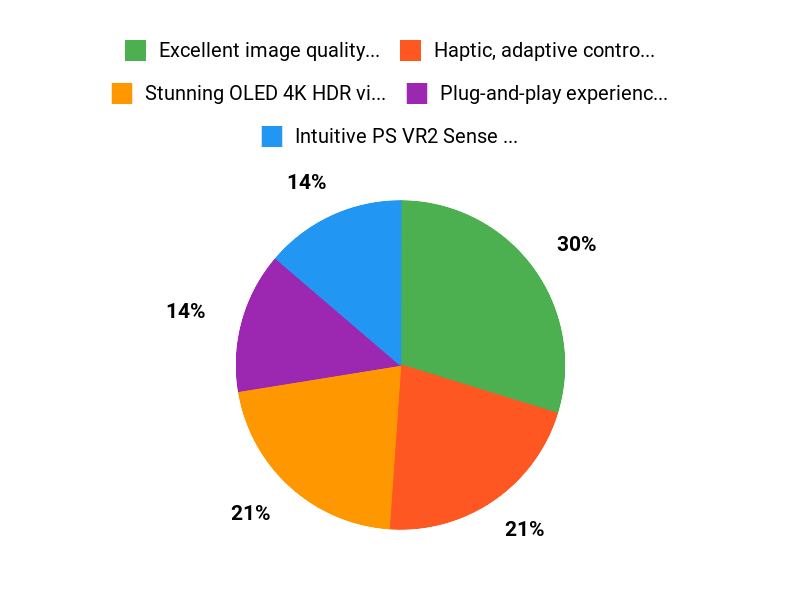
✅ Excellent image quality and immersion |
❌ Not a standalone headset — requires PS5 |
|
✅ Haptic, adaptive controllers that feel intuitive |
❌ PC support requires a separate adapter and has reported issues |
|
✅ Plug-and-play experience with PS5 |
❌ Some users experience occasional controller tracking hiccups |
|
✅ Comfortable for extended sessions for many users |
❌ Isolated reports of defects, packaging or warranty problems |
|
✅ Curated launch library with standout demo content |
❌ Motion sickness possible for sensitive players in fast games |
What People Say
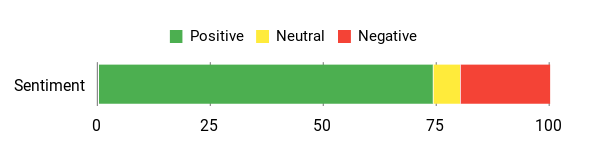
Users praise the visuals, easy PS5 setup and the immersive Sense controllers. A number of buyers note occasional tracking hiccups, patchy PC support, and a few isolated defects, but most console-first players find it compelling.
Overall Sentiment: Positive
🗣️ Julio Anzaldo
Comfortable for multi-hour sessions, near-zero PS5 setup, and a crisp graphic experience — reviewer rated comfort 4.5/5, library 4.5/5 and ease-of-use 5/5. Notes occasional controller tracking hiccups once or twice every dozen hours but praises the consistent 120 fps in several titles and foveated rendering for sharp visuals.
🗣️ Bo
Very simple setup and solid build quality (4/5). VR experience called ‘just wow’ after playing Gran Turismo 7 in VR; the reviewer did mention some motion sickness after a lap but found the headset overall compelling, especially at sale price.
Use Cases
|
Situation |
How It Helps |
|---|---|
|
Racing and driving games |
High frame-rate support and sharp OLED visuals make cockpit views clearer, helping you spot braking points and feel more connected to the road. |
|
Showcasing VR to friends |
Horizon’s scenic demos and riverboat sequence are easy to share and instantly impressive, so guests get a true sense of scale and presence. |
|
Long single-player sessions |
Adjustable headband and balanced weight distribution let you play comfortably for a couple of hours, with simple on-head adjustments if it shifts. |
|
Quick pick-up play |
Minimal setup on PS5 means you can jump into a short session without wrestling with drivers or complex tracking rigs. |
Health Perks
|
Benefit |
Description |
|---|---|
|
Light physical activity |
Many VR titles encourage standing, reaching and light movement, which gets you up and moving compared with sitting through a standard game session. |
|
Mental escape |
Immersive environments provide a good way to decompress and shift focus, offering a short mental break from everyday stressors. |
|
Improved hand-eye coordination |
Interacting with objects, aiming and timing in VR can sharpen reflexes and coordination in a fun, game-based way. |
Emotional Payoff
You get a real sense of presence — moments of genuine wonder, surprise and playfulness that make you forget you’re in a living room.
Versatility
Great for console-first gamers who want high-fidelity VR experiences, demos and social show-offs. Less versatile if you need standalone mobility; PC use is possible but requires an adapter and extra setup that has reported issues.
Comfort
Generally comfortable with an adjustable headband and balanced weight; many users can play for a couple of hours. A minority report slipping or the need for an alternative strap depending on head shape.
Fun Factor
High for immersive single-player adventures and active rhythm or action titles; the Sense controllers and 3D audio really sell the experience.
Key Benefits
- Stunning OLED 4K HDR visuals and 110º FOV
- Intuitive PS VR2 Sense controllers with haptics and adaptive triggers
- Very simple plug-and-play setup on PS5
- Comfortable adjustable headband for multi-hour play
- Strong first-party content like Horizon Call of the Mountain
Rating: 4.0 (total: 1567+)
FAQ
Is PlayStation VR2 Worth It For PS5 Owners?
If you already own a PS5, the PS VR2 delivers a clear step up in visual fidelity, immersive feedback and controller tracking compared with the previous generation, and you’ll notice improvements in realism and responsiveness in supported titles like Horizon: Call of the Mountain. The system is designed around the PS5 ecosystem, so the best, most reliable experience is with a PS5.
Keep in mind that original PS VR games aren’t automatically compatible unless the developer releases a PS VR2 version, so check the game library before you buy and look for titles optimized for the headset’s features.
Can You Use PlayStation VR2 With A PC Or Other Devices?
PC support is possible but not straightforward: using the headset on a PC often requires an official adapter or third-party workarounds, extra cables and sometimes a Bluetooth dongle, and users report mixed stability and setup complexity. Because this path is less supported and can require fiddly troubleshooting, if you want plug-and-play PC VR you may find better options elsewhere.
If you decide to try PC use, follow official Sony guidance when available, consult current community guides, and be prepared for extra steps and intermittent issues.
How Do You Maximize Comfort, Tracking And Reliability During Play?
Start by adjusting the headband and face contact to balance weight and reduce pressure, and make sure the headset sits snugly without tilting; the built-in fit controls are effective for most head shapes. Keep controllers charged, update firmware via your PS5, and if you see tracking hiccups try the small reset pinhole on a Sense controller and re-pairing it, keep the play area well lit and free of highly reflective surfaces, and position yourself within the headset’s tracking range. For motion sensitivity, use in-game comfort options and take regular breaks to reduce nausea.
If you encounter hardware defects, check packaging and seller authorization, contact Sony support for warranty service, and keep receipts and serial numbers handy for faster resolution.
Why Choose PS VR2
You should choose the PS VR2 Horizon Bundle because it combines the PS5-ready headset’s stunning OLED visuals, precise eye-tracking, and immersive haptic feedback with a comfortable fit and simple setup so you can jump into VR easily. The Horizon bundle also includes the exclusive, launch-ready game and Sense controllers, so you get a polished, console-focused experience without hunting for extra software or accessories.
Wrapping Up
If you own a PS5 and want the smoothest, most immersive console VR experience, the PSVR2 is the clearest path. The headset delivers excellent visuals, strong immersion and intuitive Sense controllers, making games like Horizon: Call of the Mountain feel more immediate and rewarding. Expect minimal setup on PlayStation and a comfortable fit for most players. Considerations: PC support can be awkward for some setups and a handful of users report occasional tracking or connectivity issues, so factor in your tolerance for occasional troubleshooting.
Overall, the PSVR2 is the best choice for console-first VR and a compelling way for you to step into immersive worlds.
Some Roundups users participate in affiliate programs including the Amazon Services LLC Associates Program, or Impact, affiliate advertising programs designed to provide a means for creators to earn fees by linking to websites. Participating users may earn a referral commission from qualifying purchases.

