

You don’t have to be a developer to care about how mixed reality will change the way you work and create. The Meta Quest Pro System pushes that shift forward by combining improved ergonomics, advanced controllers and full-color passthrough so you can move between physical and virtual spaces more naturally. If you value comfort for longer sessions and tools that favor productivity and collaboration as much as entertainment, the Quest Pro deserves a close look.
It’s built around mixed reality passthrough, eye and face tracking, and refined controllers — features that can give you more immersive meetings, better virtual desktops and new creative workflows.
TL;DR
|
Feature |
Verdict |
|---|---|
|
Ease of Use |
⭐️⭐️⭐️⭐️ ⏱️ – Mostly approachable; you’ll get started quickly but expect some software configuration and learning for advanced features. |
|
Comfort |
⭐️⭐️⭐️⭐️ 🎧 – Slimmer, better-balanced design makes long sessions less fatiguing compared with earlier headsets. |
|
Display & Visuals |
⭐️⭐️⭐️⭐️ 🔍 – High-quality lenses, eye tracking and color passthrough deliver clearer visuals and more natural focus control. |
|
Mixed Reality Capabilities |
⭐️⭐️⭐️⭐️ 🎨 – Breakthrough full-color passthrough opens practical AR use cases, though app support and polish are still evolving. |
|
Best For |
⭐️⭐️⭐️⭐️ 💼 – Ideal if you’re a developer, creator or power user who wants a productivity-oriented Quest Pro experience rather than a pure gaming device. |
Meta Quest Pro

If you’re looking for a headset that leans into mixed reality and productivity as much as gaming, the Meta Quest Pro is built with that in mind. You get a slimmer, counterbalanced design that feels lighter on your face during long sessions, clearer pancake lenses that let you move your eyes instead of your head, and full-color passthrough so you can blend the physical and virtual worlds.
The face and eye tracking make avatars feel more natural during meetings, and the self-tracking controllers bring finer hand movements into VR. Practically, it’s great for setting up multiple virtual monitors when you need extra screens on the go, sketching or prototyping ideas in 3D, or trying experimental AR workflows. For special occasions—like group design reviews or remote collaboration sessions—it helps you feel more present with others.
If you’re mainly a casual gamer, it might be more than you need, but if you care about comfort, visuals, and being able to use VR for work and creative tasks, the Pro is a strong, thoughtfully designed option.
Pros and Cons
|
Pros |
Cons |
|---|---|
|
✅ Excellent ergonomics and reduced weight compared to prior headsets |
❌ AR app support and software features are still catching up |
|
✅ High-quality passthrough and realistic avatar expressions |
❌ Passthrough clarity can be noisy or blurrier for small objects |
|
✅ Precise hand tracking and advanced haptics in controllers |
❌ Not aimed at the average casual buyer—more of an enthusiast/dev device |
|
✅ Designed for productivity with multitasking and virtual monitors |
What People Say
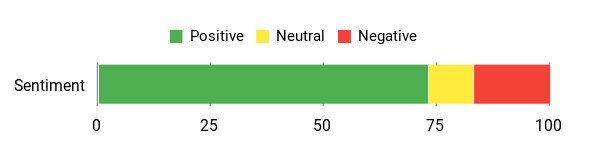
People often highlight the improved comfort, clearer lenses, and the Pro’s focus on work and dev features. Reviewers who use it for productivity like the multiple virtual screens and avatar tracking, while enthusiasts praise the controllers and mixed reality passthrough.
Overall Sentiment: Positive
🗣️ Mitchell M.
Crystal-clear lenses and eye/face tracking make a noticeable difference for long sessions; the Pro feels like a real step forward for developers and anyone who wants to use VR for work as well as play.
🗣️ Tommy
Faster performance, improved ergonomics and comfort, plus solid face/eye tracking. Great for enthusiasts who want a premium, work-capable headset though some work features are still rolling out.
Situational Benefits
|
Situation |
How It Helps |
|---|---|
|
Remote Work |
Set up multiple resizable virtual monitors so you can multitask away from a fixed desk, and use avatar expressions to feel more present in meetings. |
|
Travel |
Carry a lightweight way to get extra screens on the road without hauling multiple monitors; the headset gives you a mobile multi-monitor setup with spatial audio. |
|
Design & Prototyping |
Use precise hand tracking and controllers to sketch, model, or iterate in 3D, which speeds up idea exploration and collaboration with teammates. |
|
Casual Gaming Sessions |
Sharper lenses and improved haptics make gameplay feel more immersive and comfortable for longer play stretches. |
Ease Of Use
|
Feature |
Ease Level |
|---|---|
|
Initial Setup |
Moderate |
|
Controllers & Hand Tracking |
Easy |
|
Mixed Reality Passthrough |
Moderate |
|
Virtual Monitor Setup |
Moderate |
Versatility
High for productivity and creative use, moderate for mainstream gaming; the Pro is best if you want a multi-purpose headset that handles work, collaboration, and experimental AR.
Comfort
Very good. The counterbalanced, sleeker design reduces pressure and feels balanced for longer sessions, though you may still want additions like the full light blocker for certain setups.
Problem Solving
Strong when you need extra screen real estate, clearer visuals for detail work, or expressive avatars for remote collaboration; less helpful if you need mature AR apps right away.
Fun Factor
High for immersive VR experiences and social sessions, with added satisfaction from precise controllers and advanced haptics; not strictly a pure gaming-first headset.
Key Benefits
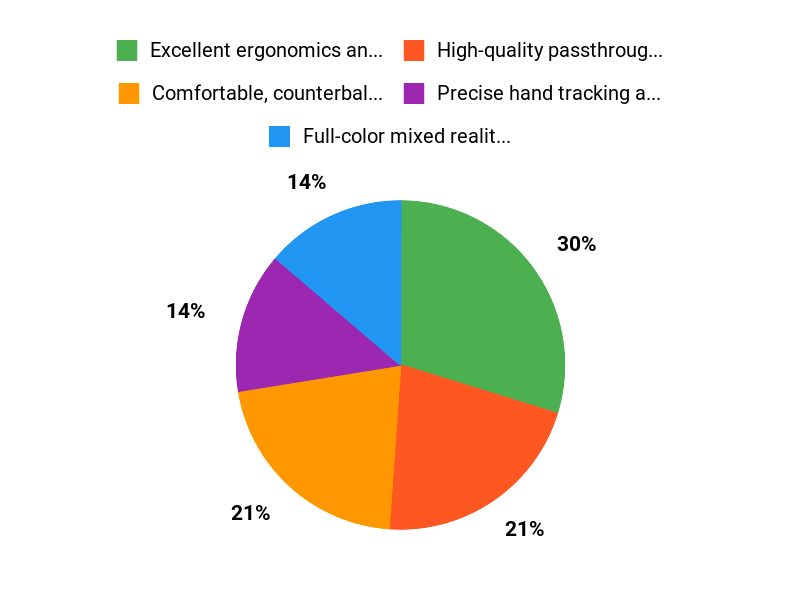
- Comfortable, counterbalanced fit for longer wear
- Full-color mixed reality passthrough for better AR interactions
- Eye and face tracking for more natural avatars and meetings
- Self-tracking controllers with fine finger input and advanced haptics
- Good visual clarity with pancake lenses and local dimming
Rating: 4.0 (total: 1005+)
FAQ
Is The Meta Quest Pro Right For You?
You should think about how you plan to use the headset before deciding. The Meta Quest Pro Quest Pro System shines if you want a mixed reality device for productivity, collaboration, development, or creative work because it brings full-color passthrough, eye and face tracking, and multiple virtual displays that make multitasking more natural.
If you’re mainly after a pure gaming headset, you may find the software library and AR-specific apps less compelling right now because the ecosystem is still maturing; many reviewers call it a developer- and enthusiast-focused step forward. Practical tip: try a demo or borrow one if you can, and match your choice to whether you value advanced MR features and comfortable long sessions over having a huge game-first catalog.
How Comfortable Is It For Long Sessions And How Do You Improve Fit?
You’ll notice the headset is designed to be slimmer and better balanced than earlier models, which helps with long-lasting comfort, but comfort varies by head shape and session length. Some users say you may need to tighten the straps more than you expect and that a top strap or counterweight can reduce forehead pressure; others prefer the full light blocker accessory to eliminate side light and improve immersion.
To get the best fit, position the headset snugly, adjust the straps until the weight sits evenly, take regular short breaks to avoid strain, and keep the face foam clean. Remember the device is intended for ages 13 and up, and the controllers feature rechargeable batteries and advanced haptics to make interactions feel more natural during extended use.
What Can You Expect From Mixed Reality Performance And App Support?
You can expect impressive color passthrough from the Pro’s sensors that makes blending physical and virtual worlds much more useful for things like a virtual desktop or spatial awareness, but small text and fine real-world details can still appear soft or noisy. The headset’s eye and face tracking enable more lifelike avatars and let the system prioritize rendering where you’re looking, which improves perceived clarity.
Keep in mind the software ecosystem for AR-first productivity tools is still growing, so some work workflows and apps may be limited or slowly rolling out; if you plan to use it with a PC, test the specific apps and connection method (wired or wireless) you need before committing. Practical tips: keep your firmware and apps up to date, allow good room lighting for best tracking, and join user or developer communities to find recommended apps and workflows that match your needs.
Why Choose Quest Pro
You choose Quest Pro because it delivers a premium mixed-reality experience with high-quality color passthrough, sharper visuals, and a comfortable, balanced design that’s built for longer sessions. You also get advanced features like eye and face tracking, precise controllers, and higher-performance internals that make it a better fit for productivity, social presence, and pro-level VR/AR use.
Wrapping Up
The Meta Quest Pro System is a deliberate step toward practical mixed reality. If you want improved comfort, refined controllers and a passthrough experience that lets you blend physical and virtual workspaces, the Quest Pro delivers a premium, productivity-focused headset.
Expect the best results if you’re into development, remote collaboration or creative tools rather than buying solely for mainstream gaming. It’s a powerful platform for early adopters and prosumers who want to shape the future of XR.
This Roundup is reader-supported. When you click through links we may earn a referral commission on qualifying purchases.

