

If you own a Meta Quest 3/3S, keeping your headset and Touch Plus controllers charged and ready makes your VR sessions smoother and less disruptive. The Meta Quest Compact Charging Dock — a small, purpose-built Charging Dock for the Quest family — aims to simplify that routine by giving you a compact charging solution with drop-in wireless controller Charging and an extended headset Cable. You’ll save time, reduce disposable battery waste, and keep your gear organized on your desk or shelf.
TL;DR
|
Feature |
Verdict |
|---|---|
|
Ease of Use |
⭐️⭐️⭐️⭐️⭐️ ⏱️ – Drop-in magnetic alignment and clear charge indicators make it effortless to dock controllers and charge quickly |
|
Charging Performance |
⭐️⭐️⭐️⭐️ 🔋 – Reliable headset and controller Charging most of the time; a minority of users report intermittent controller battery issues |
|
Compatibility |
⭐️⭐️⭐️⭐️⭐️ 🎮 – Designed for Meta Quest 3/3S and works with Active Straps without removal |
|
Design & Convenience |
⭐️⭐️⭐️⭐️ 🎨 – Compact, tidy footprint with included rechargeable batteries and extended Cable; may not fit some third‑party controller covers |
Meta Quest Compact Charging Dock

If you use a Quest 3/3S, this compact charging dock is the kind of accessory that quietly makes day-to-day VR easier. You drop your Touch Plus Controllers into the stand, the LEDs and a little beep tell you they’re charging, and the included Extended headset charging cable gives you more placement options for your headset.
It Works with Active Straps so you don’t have to remove them, and Meta bundles rechargeable lithium-ion batteries so you stop swapping disposables. For regular sessions it keeps your headset and Controllers organized and ready; for social VR nights or a longer mixed-reality session it saves you the scramble for spare batteries.
You’ll still want to be mindful of third‑party covers or certain attachments that can make the fit tight, but for a simple, reliable way to keep everything topped up it’s an easy recommendation for most Quest owners.
Pros and Cons
|
Pros |
Cons |
|---|---|
|
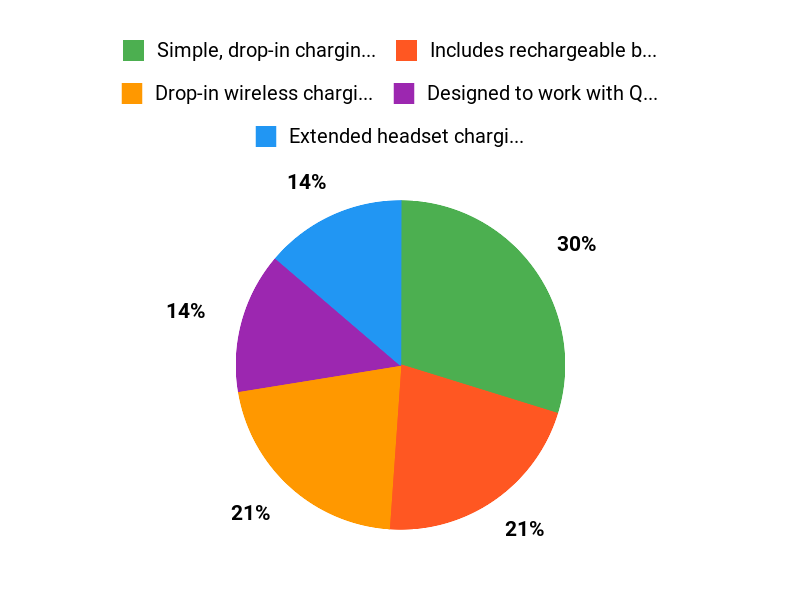
✅ Simple, drop-in charging with clear indicators |
❌ Form‑fitting cradle can conflict with third‑party covers or attachments |
|
✅ Includes rechargeable batteries and extended headset cable |
❌ Some users report occasional connection or battery seating issues |
|
✅ Designed to work with Quest 3/3S and Active Straps |
❌ A few reports of battery longevity or one controller failing early |
|
✅ Neat, compact footprint for desks or shelves |
What People Say
People generally praise how simple the dock makes charging: controllers beep and light up when seated correctly, the included batteries save you from buying AAs, and the extended headset cable gives you more flexibility. A few note the dock is form‑fitting (covers or some accessories can block charging) and occasional battery placement quirks have been reported.
Overall Sentiment: Positive

🗣️ Gage Seewald
You get the dock, cables and rechargeable batteries for the Quest controllers. The dock works well for what it is… I have charged my headset off of the dock and it works well enough. All in all a good buy.
🗣️ Ghost
Easy to set up & charging is a breeze. It literally makes a sound & lights up to let you know your controllers are on correctly & charging. When they’re done charging, the light turns green. It works flawlessly.
When It Helps
|
Situation |
How It Helps |
|---|---|
|
Daily short sessions |
You can quickly rest your Controllers between sessions so they’re topped up and ready the next time you jump into a game. |
|
Group or party VR nights |
With both Controllers and your Quest headset charging and organized in one spot, swapping players is faster and less awkward. |
|
Limited space setups |
The compact dock keeps cables tidy and frees desk or shelf space while still giving you an Extended headset cable for flexible placement. |
Health Benefits
|
Benefit |
Description |
|---|---|
|
Less bending and fumbling |
You won’t be constantly crouching to swap disposable batteries, which reduces small repetitive movements and awkward positions. |
|
Lower stress during play |
Knowing your Controllers are charged reduces interruptions and the frustration that can spike during intense sessions. |
|
Cleaner play area |
A tidy dock cuts down on loose batteries and cables, lowering trip or knock‑over hazards in your play zone. |
Emotional Benefits
You’ll feel more relaxed and prepared when your Quest gear has a dedicated home to charge—less scramble, fewer mid‑game interruptions, and a small sense of order that makes gaming more enjoyable.
Versatility
You can use it for everyday charging, weekend multiplayer sessions, or when you want a neater setup—Works well in most small spaces and pairs with Active Straps for convenience.
Aesthetic Appeal
The compact black design blends into a desk or living room without drawing attention and keeps Controllers neatly stored when not in use.
Comfort
By cutting down on battery swaps and offering clear charging indicators, it reduces small hassles so you can focus on playing comfortably.
Key Benefits
- Drop-in wireless charging for Touch Plus Controllers
- Extended headset charging cable for easier placement of your Quest
- Includes rechargeable lithium-ion batteries so you skip disposable cells
- Works with Active Straps without removing them
- Compact design keeps Controllers and Headset organized
Rating: 4.4 (total: 363+)
FAQ
Does The Charging Dock Work With Meta Quest 3/3S And Third‑Party Accessories?
Yes — the Meta Quest Compact Charging Dock Works with Meta Quest 3/3S and provides drop‑in Wireless Charging for Touch Plus Controllers while the headset charges via the Extended headset charging cable. You can use the Dock with Active Straps without removing them, but because the controller cradles are form‑fitting you may need to remove bulky covers or certain third‑party attachments (for example some golf club or full‑grip accessories) so the controllers sit properly and make contact.
If you rely on a strap that replaces the battery door, check that it’s compatible with the Dock first to avoid fit or charging issues.
Are The Included Rechargeable Batteries Reliable For Intense Play And Will They Prevent Disconnects?
The Dock includes rechargeable lithium‑ion batteries and many users find they eliminate frequent AA replacements and provide several hours of play, but runtimes vary with how intensely you play. Some users report around four hours under heavy use while others get longer sessions; high‑impact games like Beat Saber can reveal weak battery packs or poor seating and cause intermittent disconnects. If you see random disconnects, make sure the batteries are fully seated and the contacts are clean, try reseating or resetting them, and test without controller covers.
If problems persist you should contact Meta support for replacement batteries or consider keeping a set of disposable AA batteries as a backup.
What Are The Best Setup And Troubleshooting Tips For Smooth Charging?
Place the Dock on a stable surface and connect the Extended headset cable to the headset port so you have flexible placement. When you dock controllers make sure they sit all the way into the cradles — you should hear a beep and see the charging light to confirm contact, and the light typically turns green when fully charged.
Clean the cradles and battery contacts if charging is inconsistent, remove thick silicone covers when necessary, and avoid forcing controllers into the Dock. If a controller repeatedly fails to charge, remove and reseat the battery, check for firmware updates on your headset, and try swapping batteries between controllers to isolate the issue.
For long‑term convenience, dock the controllers after each session to keep them topped up and organized so you always have ready controllers when you jump back into VR.
Why Buyers Love It
You love it because it snaps your Meta Quest controllers into place with intuitive magnetic connectors and keeps them topped up without fuss, so you always grab ready-to-play gear. Its compact, tidy design clears up cable clutter and feels sturdy and reliable, with clear charge indicators so you know when everything’s good to go.
Wrapping Up
The Meta Quest Compact Charging Dock — Works with Meta Quest 3/3S — Extended Headset Charging Cable — Wireless Charging for Touch Plus Controllers is a practical, space‑saving answer to keeping your VR gear ready when you are. You get drop-in wireless Charging for the controllers, an extended headset Cable, rechargeable batteries, and a compact design that tucks into most setups. It’s ideal if you want less downtime, fewer disposable batteries, and a cleaner desk.
Be aware that some users report occasional controller battery connection issues and that the form-fitting cradles may not accept all third‑party covers or accessories. Overall, if you use a Meta Quest 3/3S and want a tidy, mostly dependable Charging Dock for headset and controllers, this is a sensible choice with strong convenience benefits and broad compatibility.
This Roundup is reader-supported. When you click through links we may earn a referral commission on qualifying purchases.

