

If you’re curious about getting into VR without dealing with cables and a PC, the Meta Quest 3S positions itself as a budget-friendly standalone VR that still unlocks a lot of what makes modern headsets fun: gaming, mixed reality, media and social hangouts. You’ll appreciate how easy it is to set up, the included 128GB storage, and bundled content like Batman: Arkham Shadow plus a three-month trial of Meta Quest+. This review explains what the headset does well, where it compromises compared with higher-end models, and how those trade-offs affect your experience so you can decide whether it fits your needs.
TL;DR
|
Feature |
Verdict |
|---|---|
|
Ease of Use |
⭐️⭐️⭐️⭐️ ⏱️ – Quick setup and fully standalone play make it very easy to jump into VR. |
|
Visuals & Tracking |
⭐️⭐️⭐️⭐️ 🎨 – Crisp visuals and responsive tracking for most apps, though field of view and optics trail flagship models. |
|
Comfort & Fit |
🔧 – Lightweight and wireless, but the stock strap and weight distribution can get tiring on long sessions; most users upgrade the strap. |
|
Content & Connectivity |
🌐 – Access to the Quest store, Meta Horizon social spaces, and optional PC link to SteamVR provides a broad library and social features. |
|
Battery & Longevity |
🔋 – Typical play sessions run a couple of hours; consider battery accessories and a protective case for long-term care. |
Meta Quest 3S

If you’re curious about VR but don’t want to fuss with a PC or bulky gear, the Meta Quest 3S is the kind of headset that makes getting into mixed reality feel straightforward. You can pop it on and jump into crisp visuals for games, set up virtual screens for work or streaming, or turn your living room into a tiny home theater.
The passthrough AR feels useful more than gimmicky — you can keep an eye on your real space while placing floating apps or screens around you. Reviewers commonly praise the sharp image, responsive tracking, and the wide mix of social and fitness features, though many suggest swapping the stock strap if you plan on long sessions.
For everyday media, casual gaming, fitness sessions, and showing VR to friends, it’s a practical, lightweight option that won’t make setup a chore. If you want something immersive without a big tech overhaul, this is a solid pick to start with.
Pros and Cons
|
Pros |
Cons |
|---|---|
|
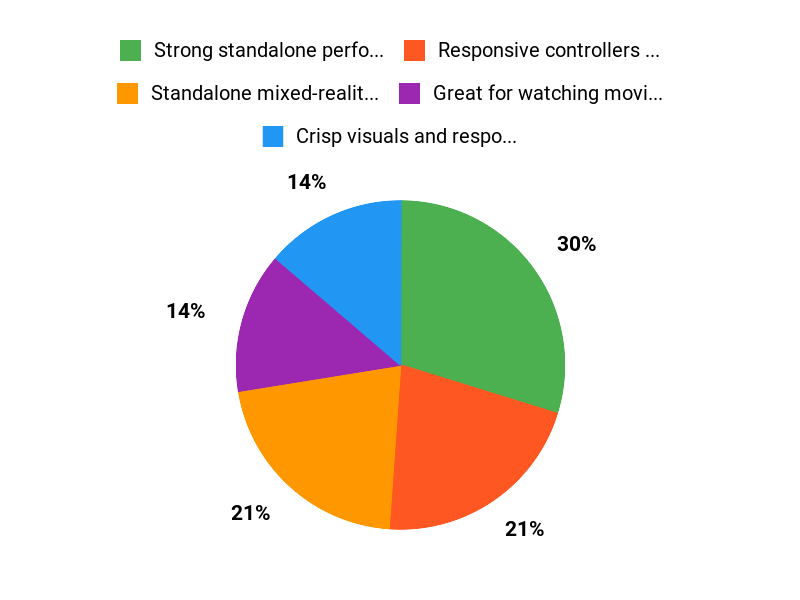
✅ Strong standalone performance and mixed-reality features |
❌ Stock head strap is flimsy for extended play |
|
✅ Responsive controllers and solid tracking |
❌ Field of view and lens sweet spot are narrower than higher-end models |
|
✅ Great for watching movies, social apps, and casual fitness |
❌ Battery lasts a couple of hours for active use |
What People Say
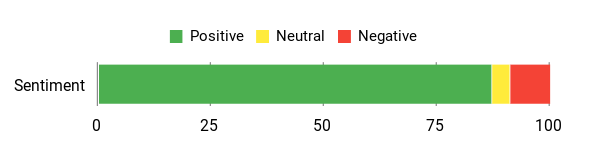
People keep coming back to the visuals and how easy the Quest 3S is to use: sharp image quality, reliable tracking, and versatile mixed-reality features. Common trade-offs mentioned are the stock strap (many upgrade it) and limited battery life for marathon sessions. Overall the consensus is you get a lot of fun and functionality without complicated setup.
Overall Sentiment: Positive
🗣️ Amazon Customer
A pro reviewer noted the 3S punches above its weight: similar color passthrough and strong standalone performance, access to Quest Store plus SteamVR via Link, and good build quality — though the lenses limit field of view compared to Quest 3 and a better head strap helps longer sessions.
🗣️ Booty’d
An enthusiastic early user said the visuals are crisp, controls responsive, and linking accounts is painless. They loved the space-exploration and media experiences, but warned the stock strap is lacking for long sessions and recommended upgrading it for comfort.
Use Cases
|
Situation |
How It Helps |
|---|---|
|
Watching Movies |
Turn any room into a personal theater with a vibrant virtual screen and easy playback of streaming apps. |
|
Casual Gaming |
Standalone performance and responsive tracking let you jump into immersive games without a PC. |
|
Work from Home |
Pull up multiple virtual screens to multitask while still seeing your room with passthrough AR. |
|
At-Home Workouts |
Lightweight wireless freedom and fitness apps make moving around easy — just consider a better strap for comfort. |
Health Benefits
|
Benefit |
Description |
|---|---|
|
Active Exercise |
VR fitness apps make cardio and movement more engaging, helping you stay motivated compared with traditional workouts. |
|
Reduced Sedentary Time |
Playing active VR games encourages standing and moving, which can break up long sitting sessions. |
|
Eye Comfort Tips |
Take regular breaks and adjust fit — several users noted long sessions can strain the face area and eyes without pauses. |
|
Safer Social Play |
Passthrough AR keeps your room visible so you can move around more safely during mixed-reality experiences. |
Versatility
You can use the Quest 3S for solo gaming, group hangouts, watching movies, or even as a lightweight productivity setup — the mixed-reality passthrough is what makes it flexible for both fun and practical tasks.
Comfort
Out of the box it’s fairly light, but reviewers frequently recommend upgrading the head strap for longer sessions because the stock strap can feel flimsy and cause pressure points.
Problem Solving
The headset solves the “easy VR” problem: no PC required, quick setup, and a big library of apps. If you need extended play time or a wider field of view, accessories like a halo strap or prescription inserts are common solutions.
Travel Friendliness
It’s fairly travel-friendly thanks to its standalone design, but you should pack a protective case and avoid leaving the lenses exposed to direct sunlight — reviewers warn that lens damage can happen if it’s mishandled.
Key Benefits
- Standalone mixed-reality with easy setup
- Crisp visuals and responsive tracking
- Good library of games, media and social apps
- Lightweight for casual use and fitness
Rating: 4.5 (total: 2926+)
FAQ
Is The Meta Quest 3S Worth Buying For You?
If you’re new to VR or want a capable all-in-one headset without the complexity of a PC, the Meta Quest 3S is a very strong option: it’s standalone, comes with 128GB of storage, and includes extras like Batman: Arkham Shadow and a trial of Meta Quest+. You’ll get sharp visuals, responsive tracking, and excellent passthrough that blends AR and VR in useful ways, so it’s especially good for casual gaming, media, workouts, and social apps. Keep in mind it’s a budget model compared with flagship headsets: the lenses and field of view are a bit more limited than higher-end models and achieving a perfect fit can take fiddling.
If you value easy setup, a broad content library, and immersive passthrough, it’s worth considering; if you demand the absolute best optics or long-term flagship performance, you might look at the higher-tier models instead.
How Comfortable Is The Headset And What Accessories Should You Consider?
You’ll find the Quest 3S fairly light at around 2.2 pounds but the included strap and stock padding can feel flimsy during long sessions, so many users recommend upgrading to a halo or rigid strap for better weight distribution. Battery life is generally about 1.5–2 hours per charge for active use, so plan breaks, use a long USB cable to top up while you play, and switch your controllers to rechargeable batteries to avoid frequent disposables.
If you wear glasses, consider prescription lens inserts rather than forcing the headset adjustments; be careful when adjusting the glasses mechanism to avoid damage. Also get a protective carrying case and avoid exposing the lenses to direct sunlight to reduce the risk of damage.
Can You Use The Quest 3S With A PC, Is It Safe For Kids, And How Do You Avoid Motion Sickness?
You can use the Quest 3S standalone right out of the box for the Quest Store apps and media, and you can link it to a compatible PC via Meta Link to access SteamVR and PC-only titles when you want higher-end experiences. Tracking and controllers are responsive and hand tracking works well for many apps.
For kids, Meta’s guidance starts at accounts for 10+, but you should supervise younger players closely; many reviewers recommend supervision for under 16 due to content, privacy, and physical safety. To avoid motion sickness, start with short sessions, prefer seated or teleport-style experiences at first, adjust the fit and IPD carefully, and use the passthrough/guardian boundary so you always know your real-world surroundings.
Why Choose Quest 3
You’ll pick the Quest 3S because it delivers noticeably better visuals and mixed-reality features at a budget-friendly price, so you get immersive experiences without needing a high-end PC. It’s also comfortable, easy to set up as a standalone headset, and gives you access to Meta’s large content library — a practical choice if you want strong VR value.
Wrapping Up
The Meta Quest 3S is a great entry-level standalone VR option if you want wireless, easy-to-use virtual and mixed-reality experiences without the complexity of PC tethering. You get solid visuals, accurate tracking, a broad content library, and some bundled games and a Meta Quest+ trial to get started. The main trade-offs are a narrower field of view and optics compared with flagship models, a stock strap that many people replace for longer sessions, and a typical two-hour battery life that invites accessories if you plan extended play.
If you want convenience, a wide app ecosystem, and straightforward social and media uses, this headset will serve you well; if your priority is the absolute best optics or long-term flagship longevity, you may want to consider a higher-end model instead. In short, you’ll likely be satisfied if you value accessibility and content breadth, but plan to buy a better strap or battery solution for the best day-to-day comfort.
Some Roundups users participate in affiliate programs including the Amazon Services LLC Associates Program, or Impact, affiliate advertising programs designed to provide a means for creators to earn fees by linking to websites. Participating users may earn a referral commission from qualifying purchases.

