

If you own a Meta Quest 3, a dedicated charging dock makes a bigger difference than you might expect. It helps you keep your headset and controllers ready, reduce cable clutter, and protects batteries so you can jump into VR without interruptions. This guide compares five popular docks so you can choose one that matches your priorities — whether you want fast, reliable charging, a compact budget option, or a dock that doubles as a display piece for your setup.
You’ll learn which docks deliver the best speed, design, included extras, and value so you get the right accessory for how you use VR.
Top Picks
|
Category |
Product |
Score |
|---|---|---|
|
🏆 Best Overall |
Hurra Charging Dock for Meta Quest 2 (works with Quest 3 via included adapters) |
91/100 |
|
💰 Best Value |
85/100 |
|
|
⚡ Best Performance |
RGB Charging Dock for Meta Quest 3/3S — PD 18W Compatible (ArocoVr) |
78/100 |
|
🎯 Best Design |
Charging Dock for Meta Quest 3/3S (Saqico) with RGB Light & Magnetic Controller Charging |
83/100 |
|
🚀 Best Budget |
Charging Dock for MetaQuest 3S — Vertical Charging Stand (CBDYWVR) |
79/100 |
Selection Criteria
You want a dock that fits how you use VR, so we focused on factors that affect daily convenience and long-term value. Compatibility: Does the dock support Meta Quest 3 (and 3S or Quest 2 if you also own those)?
Charging speed: We prioritized docks with PD support, higher wattage, or data from the manufacturer about fast charging. Design and ergonomics: Magnetic alignment, how the headset sits, RGB or indicator lights, footprint, and build quality matter for your setup.
Included extras: Rechargeable batteries, adapter plates, and cables reduce cost and simplify setup. Ease of use and reliability: We weighed customer feedback around simple snap-in charging and consistent performance. Price and value: We compared what you get for the price — a cheaper dock can still be the best choice if it reliably charges your headset and controllers.
Finally, we used customer ratings and common themes in reviews to judge long-term satisfaction.
Saqico Charging Dock for Meta Quest 3

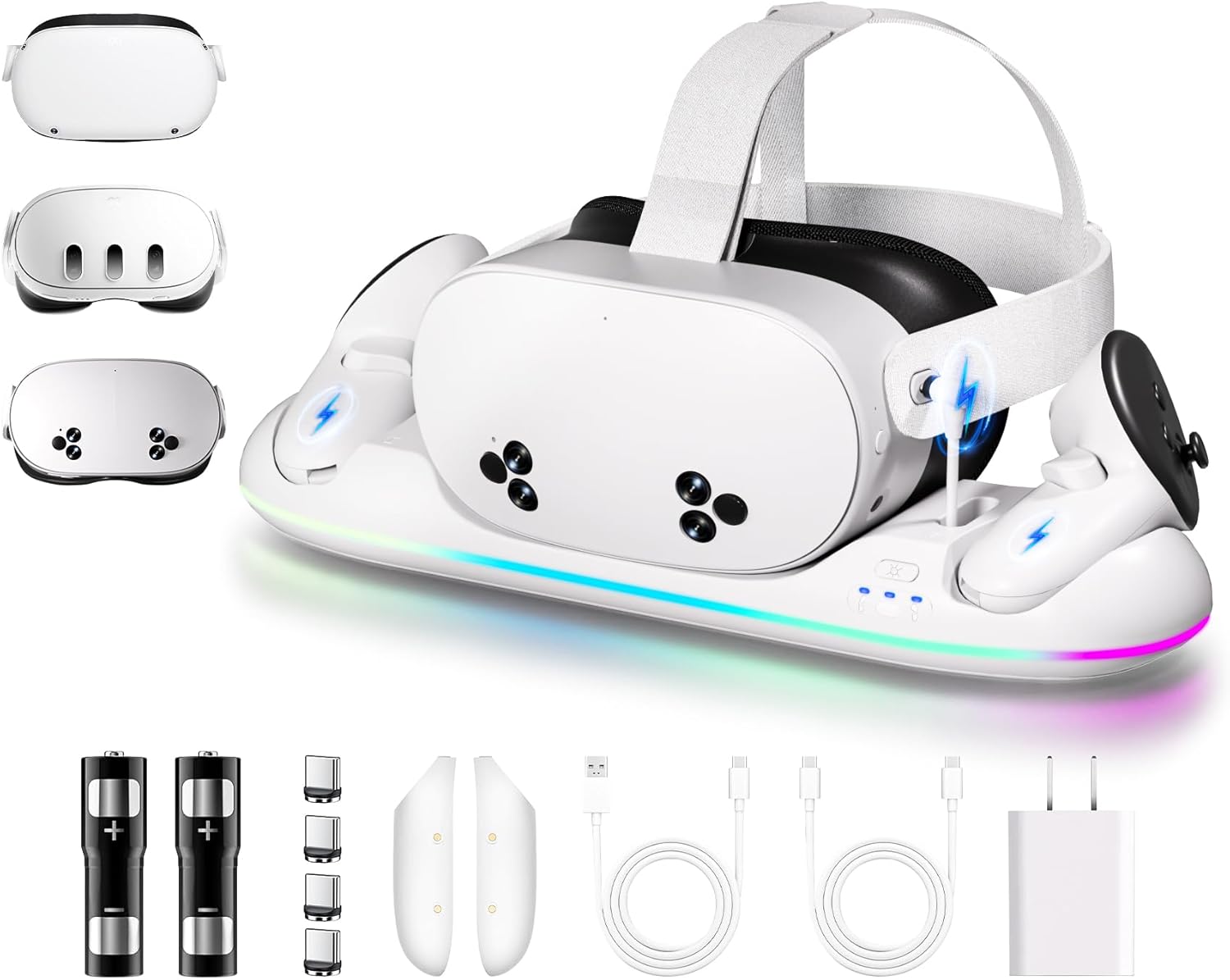
If you want a tidy spot to park your Meta Quest 3 and grab a charged session without fuss, this dock makes that easy. You just snap the headset and controller batteries into place and the magnetic connectors do the rest.
It’s built around practical things you’ll notice every day: a 20W USB‑C input that gets the headset topped up in about 2–3 hours, controller batteries that charge in roughly 3 hours, plus two 2,100 mAh rechargeable packs so you’re not swapping AAs every week. The RGB lighting is optional but fun as a status indicator or to add a little ambiance to your setup, and extra USB ports mean the dock can multitask charging your phone or a speaker too.
For daily use it keeps your gear organized and ready; for occasional guest sessions or family play it’s a neat, obvious place to leave everything. If you like a clean desk and hate hunting for cables, this is a useful, space‑saving addition that I’d recommend for most Quest 3 owners.
What People Say
Users like how the dock tidies up their setup and the snap‑in magnetic charging. Multiple reviewers highlight reliable charging times, the convenience of rechargeable controller packs, and the RGB lighting as a useful status cue and aesthetic touch.
Overall Sentiment: Positive

🗣️ David S McMeans
Design and usability stand out: the futuristic look and color‑changing LEDs add ambiance, while magnetic charging for the headset and snap‑in controller batteries makes charging seamless. The reviewer found charging reliable and appreciated the extra USB port and that the dock doubles as a display stand.
🗣️ Ryan Morris
Noted the broad compatibility (Quest 2, 3 and 3S), the 20 W dock rating and the included 30 W brick, and praised the convenience of just setting the headset on the dock after gaming. Liked the RGB as a working indicator and said the rechargeable batteries and magnetic ports make it a set‑and‑forget solution.
Use Cases
|
Situation |
How It Helps |
|---|---|
|
Daily Play Sessions |
You can park the headset and controllers after each session and have everything charged and ready the next time without dealing with cables. |
|
Family or Shared VR |
The dock provides a single, obvious spot for gear so kids or guests know where to return controllers and the headset, reducing lost batteries and low‑power surprises. |
|
Small Desks or Shelves |
Acts as a compact display stand that keeps cables hidden and frees up shelf space while charging multiple devices at once. |
|
Travel Prep or Event Setup |
Having controllers and headset fully charged overnight means you can grab them and go for demos or trips without last‑minute charging. |
Ease of Use
|
Feature |
Ease Level |
|---|---|
|
Headset docking |
Very easy |
|
Controller battery swap |
Easy |
|
Initial setup (cable, adapter) |
Moderate |
|
RGB mode switching |
Easy |
Versatility
The dock works as more than a charger: it handles headset and controller power, offers extra USB ports for phones or speakers, and doubles as a display stand — useful whether you game solo, with family, or demo VR to friends.
Safety
Built‑in protection against overcharging, overload and overcurrent helps protect your headset and controller batteries during overnight charging.
Innovation
Magnetic charging ports and the inclusion of rechargeable controller battery packs designed for Quest 2/3 models simplify charging and avoid fiddly cable connections.
Comfort
The dock’s tidy footprint and secure magnetic seats reduce the hassle of handling cables and loose batteries, making your VR setup feel more polished and comfortable to use.
Key Benefits
- Magnetic snap‑in charging for headset and controllers
- Includes two rechargeable 2,100 mAh controller batteries
- Fast charging with 20 W USB‑C input (headset 2–3 hours)
- RGB lighting with multiple modes and extra USB ports
- Keeps your VR area tidy by doubling as a display stand
Rating: 4.1 (total: 109+)
Kinwin Magnetic Charging Dock for Meta Quest 3
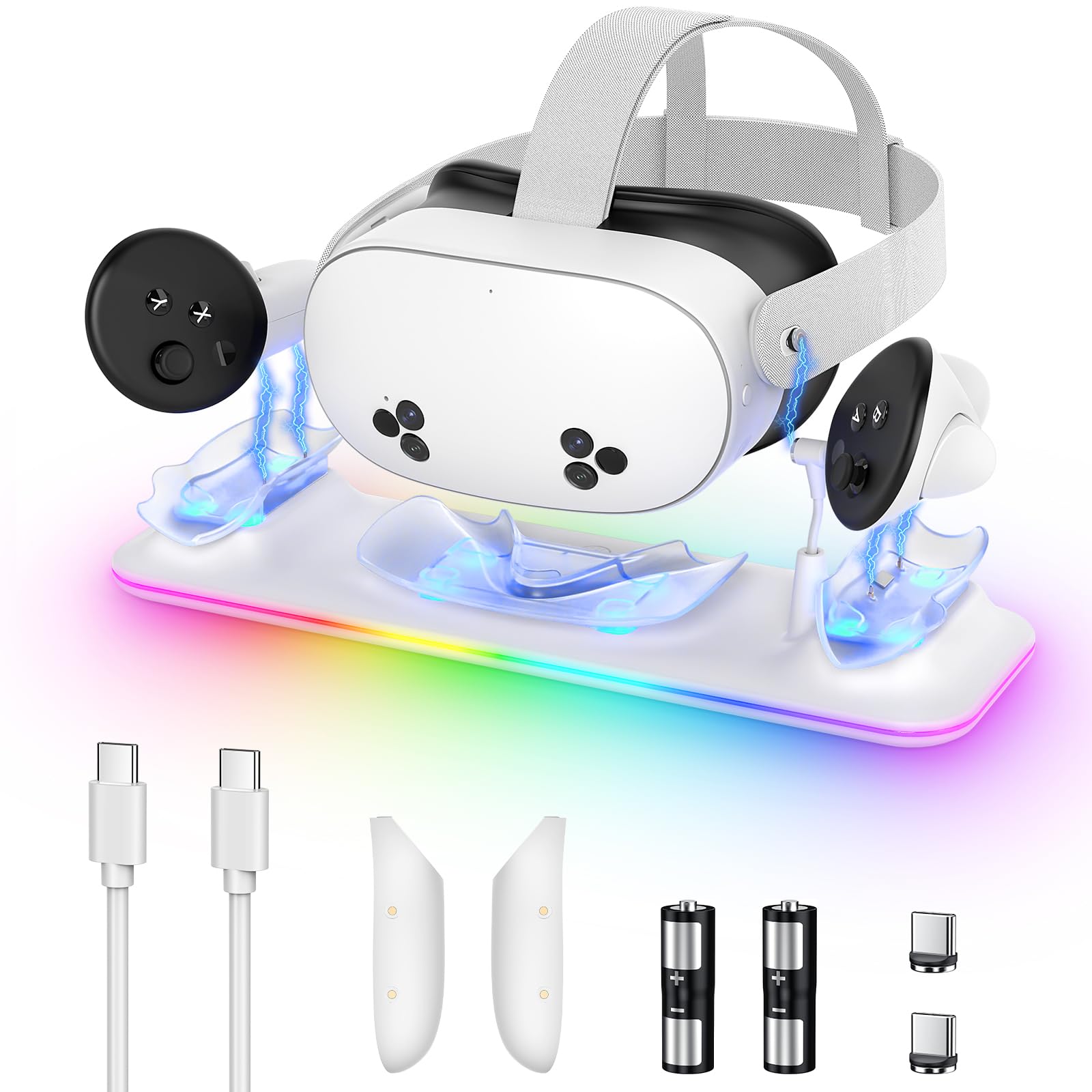
If you want a tidy, obvious place to park your Meta Quest 3 and never hunt for batteries again, this dock makes that part painless. You set the headset on the magnetic USB‑C connector and snap the controller batteries into their slots — the lights show orange while charging and green when finished, so you can tell status at a glance. It charges the headset in about three hours and controllers in roughly four, and the included rechargeable batteries mean you won’t be constantly replacing AAs.
For everyday use it keeps your gear organized and ready; for guests or family sessions it gives everyone a simple spot to return controllers. The RGB lighting adds some atmosphere if you want it, but more importantly it doubles as a quick charge indicator.
If you like things neat and hate fiddling with tiny cables, this is a sensible, space‑saving pick to keep your Quest 3 ready to go.
What People Say
Users appreciate the convenience of snap‑in magnetic charging and the clear red/green LED indicators. Many mention fewer battery swaps and that the dock helps keep a gaming area tidy.
Overall Sentiment: Positive

🗣️ Karen Dupre
Keeps everything organized while charging and the lights make it easy to see status—battery life lasts a long time and the dock is simple to use. The reviewer specifically praised how neat it looks and that it lights up beautifully while charging.
🗣️ Jo
Makes charging easy for kids and adults: just set controllers down without plugging anything in. Reviewers noted the red/green controller indicators that show charging vs. full and appreciated not having to buy disposable batteries anymore.
Use Cases
|
Situation |
How It Helps |
|---|---|
|
Daily Play Sessions |
You can park headset and controllers after each session so everything’s charged and ready next time without hunting for cables or fresh batteries. |
|
Family or Shared Use |
A single, obvious charging spot makes it easy for kids or guests to return controllers correctly and reduces low‑battery surprises. |
|
Small Desks or Shelves |
The dock combines storage and charging in one compact footprint, keeping cables out of sight and freeing surface space. |
|
Quick Setups and Demos |
Having headset and controllers topped up overnight means you can grab them for demos or trips without last‑minute charging. |
Ease of Use
|
Feature |
Ease Level |
|---|---|
|
Headset docking |
Very easy |
|
Controller battery swap |
Easy |
|
Checking charge status (LEDs) |
Very easy |
|
Initial cable/connector alignment |
Moderate |
Versatility
Beyond charging headset and controllers, it serves as a neat display stand and keeps spare rechargeable packs on hand, useful whether you game solo, with family, or demo VR to friends.
Safety
Built‑in protections guard against overcharge and current issues, and magnetic connectors reduce wear that could cause poor contact over time.
Innovation
The magnetic USB‑C connector and tailored rechargeable controller batteries simplify connections and cut down on fiddly plug‑in steps.
Comfort
A tidy, stable docking routine and clear LEDs make powering up less of a chore, so your VR setup feels more organized and comfortable to use.
Key Benefits
- Charges headset and two controllers simultaneously with magnetic USB‑C
- Included rechargeable controller batteries and covers reduce disposable battery use
- Visual RGB/status lights make it easy to tell when devices are charging or done
- Magnetic connector reduces wear from plugging and unplugging
- Compact design keeps your VR area neat and doubles as a display spot
Rating: 4.2 (total: 409+)
Hurra Charging Dock for Meta Quest 2

If you want a single, tidy spot to park your Quest gear, this Hurra dock makes it easy. You set the headset on the magnetic USB‑C connector and drop the controller batteries into their slots — LEDs glow blue while charging and green when done, and there’s an RGB strip if you want a bit of mood lighting.
It’s built to charge headset and controllers at once (the listing says full charges in the 4–6 hour range) and the kit includes rechargeable 2100mAh batteries and magnetic adapters so you aren’t hunting AAs. For everyday play it keeps your setup neat and ready; for guests or demo sessions it gives everyone an obvious place to return controllers.
There are also built‑in protections and a sleep mode for the lights so it stays practical as well as pretty. If you like a compact, no‑fuss charging routine and value included batteries, this is a solid, space‑saving option to keep your Quest ready to go.
What People Say
Users highlight how the magnetic snap‑in setup turns charging into a no‑fuss habit, praise the clear LED indicators, and appreciate that the kit includes rechargeable batteries and all necessary cables.
Overall Sentiment: Positive

🗣️ Danny
Keeps everything organized while charging the headset and both controllers at once. The magnetic charging works smoothly, the LED indicators make status obvious, and the included rechargeable batteries and adapters mean less faffing around with disposables.
🗣️ Bri
Does what it’s supposed to: easy setup, looks clean on a shelf, and charges quickly. Reviewers liked the RGB accent lighting and said the dock made daily charging simple and consistent.
Use Cases
|
Situation |
How It Helps |
|---|---|
|
Daily Play Sessions |
You can drop headset and controllers on the dock after each use so everything’s topped up and ready for the next session without swapping batteries or chasing cables. |
|
Family or Shared Use |
A single, obvious charging spot makes it easy for others to return controllers correctly and reduces last‑minute low‑battery surprises. |
|
Show-and-Tell or Demos |
Having headset and controllers charged overnight means you can grab them for demos or quick sessions without hunting for chargers. |
|
Small Living Spaces |
The dock combines storage and power in one compact unit, keeping cables out of sight and freeing up shelf or desk space. |
Ease of Use
|
Feature |
Ease Level |
|---|---|
|
Headset docking |
Very easy |
|
Controller battery swap |
Easy |
|
Checking charge status (LEDs) |
Very easy |
|
Initial magnetic adapter installation |
Moderate |
Versatility
Built mainly for Meta/Oculus Quest 2, the dock still doubles as a display stand and a central charging hub for household or demo use; included magnetic adapters and spare batteries make it handy for extended play or family sharing.
Safety
Multiple charging protections and a micro intelligent circuit management system help prevent overcharge and manage current; a sleep mode lets you turn off the LEDs while still charging.
Innovation
Magnetic attraction connectors for headset and controllers simplify docking, and the dock’s battery management claims to extend battery life via micro intelligent circuit repair and protections.
Comfort
A stable, simple docking routine and clear lights remove the little annoyances of charging, so your VR routine feels smoother and your play area stays uncluttered.
Key Benefits
- Charges headset and two controllers simultaneously with magnetic USB‑C connectors
- Includes two rechargeable 2100mAh controller batteries and magnetic adapters to reduce disposable battery use
- Clear LED status lights plus an RGB strip for quick visual charge feedback
- Built‑in protections and a sleep mode for LEDs to reduce overnight light and preserve battery health
- Compact, all‑in‑one footprint keeps your VR area tidy and doubles as a display stand
Rating: 4.5 (total: 321+)
ArocoVr RGB Charging Dock for Meta Quest 3/3S
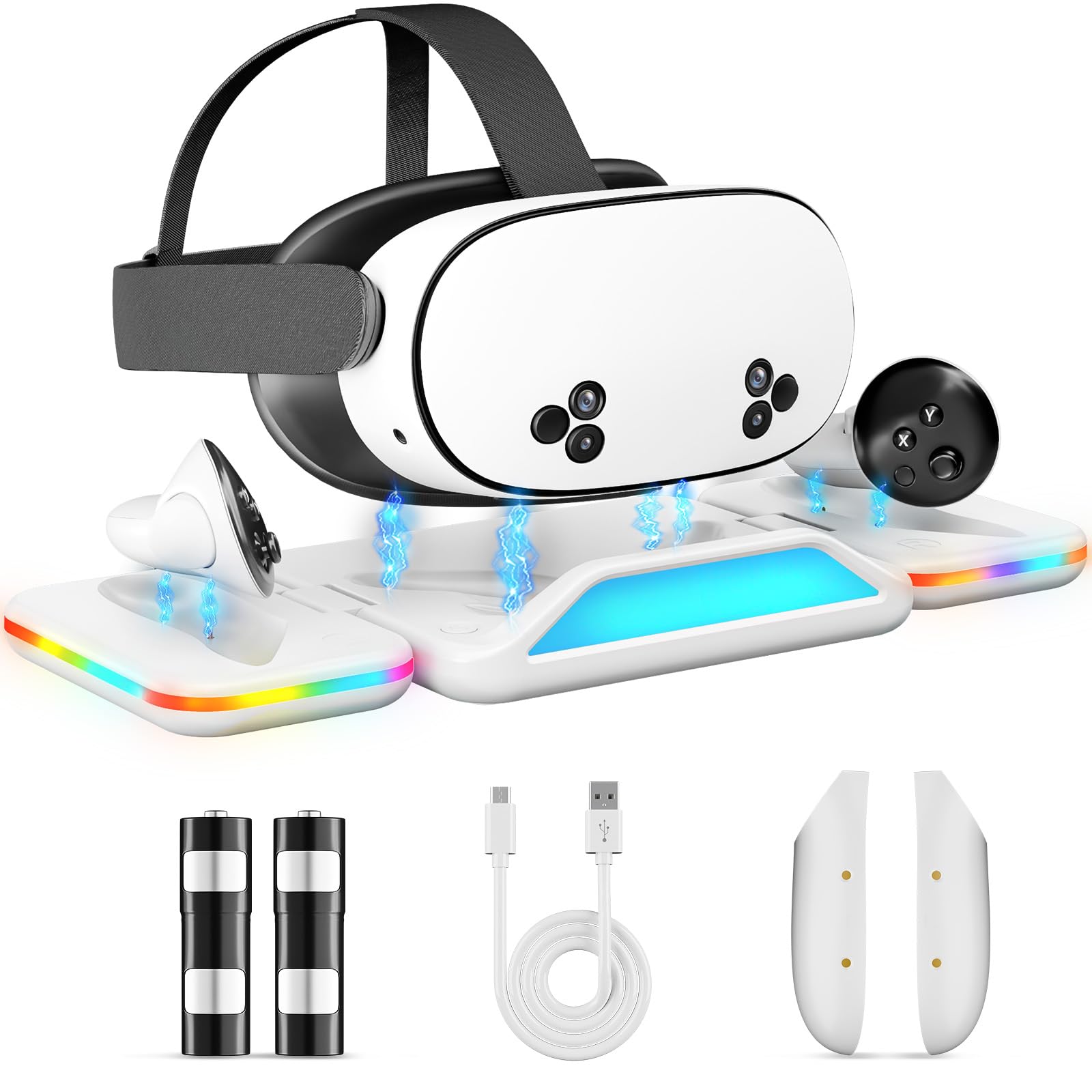
If you want a neat, plug‑and‑play home for your Quest 3 kit, this ArocoVr dock is built around convenience. You set the headset on the magnetic USB‑C point and drop the controller batteries into their slots; the dock supports PD 18W which helps top devices faster than a standard USB charge, and there’s an RGB strip if you want subtle lighting while it charges.
The package includes two 2100mAh rechargeable batteries so you’re not constantly swapping AAs, and the magnetic contacts make docking feel effortless. For everyday play it keeps your setup tidy and always ready; for demos or when friends drop by, you can hand someone a fully charged controller without the scramble.
If you like a compact, organized charging routine with a little bit of style, this one’s worth a look.
What People Say
People appreciate the snap‑in magnetic connectors, the convenience of the included 2100mAh rechargeable batteries, and the quick top‑ups thanks to PD 18W support. Many call out the tidy look and clear charge indicators as real everyday wins.
Overall Sentiment: Positive

🗣️ AlexVR
The magnetic docking is solid — the headset snaps in easily and the LEDs clearly show charging progress. The included 2100mAh batteries mean I’m not swapping disposables all the time, and PD 18W compatibility cuts down how long I wait between sessions.
🗣️ Sam
Loved how tidy it made my setup. Controllers slide into the battery bays smoothly and the RGB accent lighting looks nice without being overpowering. Setup was straightforward and the dock holds everything securely while charging.
Use Cases
|
Situation |
How It Helps |
|---|---|
|
Daily Play Sessions |
You can park the headset and controllers after each use so everything’s topped up and ready for the next session without hunting for chargers. |
|
Family or Shared Use |
A clear, central charging spot reduces confusion—others can return controllers correctly and you avoid last‑minute low battery problems. |
|
Show-and-Tell or Demos |
Having everything charged overnight means you can grab gear for demos or quick sessions without scrambling for cables. |
|
Small Living Spaces |
The dock combines storage and power in one compact unit, keeping cables tucked away and freeing up shelf or desk space. |
Ease of Use
|
Feature |
Ease Level |
|---|---|
|
Headset docking |
Very easy |
|
Controller battery swap |
Easy |
|
Checking charge status (LEDs/RGB) |
Very easy |
|
Initial magnetic adapter setup |
Moderate |
Versatility
Designed specifically for Meta Quest 3/3S, it still doubles as a display stand and a centralized charging hub—handy for everyday use, guests, or demo setups thanks to the included spare batteries.
Safety
Built‑in charging protections manage current and prevent overcharge, and the LEDs help you spot charge status so you don’t leave devices hooked up longer than needed.
Innovation
Combines PD 18W charging with magnetic snap‑in connectors and included rechargeable 2100mAh batteries to simplify swaps and speed up turnaround between sessions.
Comfort
A stable dock and clear status lights remove little day‑to‑day annoyances, so charging becomes a quick, predictable part of your VR routine rather than a chore.
Key Benefits
- Magnetic USB‑C docking for headset and dedicated slots for controller batteries
- PD 18W compatibility for faster top‑ups compared with standard USB charging
- Includes two rechargeable 2100mAh controller batteries so you avoid disposables
- RGB accent lighting and LEDs to indicate charging status at a glance
- Compact footprint keeps your VR area organized and doubles as a display stand
Rating: 4.4 (total: 189+)
CBDYWVR Vertical Charging Stand (White)

If you want a tidy home for your Quest headset that doubles as a simple display, this CBDYWVR vertical stand does the job. You set your Meta Quest on the cradle, plug the included cable into the base, and the open design makes it easy to grab the headset between sessions.
The three LED lighting modes add a little ambiance and make it easy to see the stand in a dim room, and the parts pack down compactly if you ever need to stash it or bring it to an event. For daily play it keeps your setup organised and ready; for demos or when friends drop by, it looks presentable on a desk or shelf.
Be aware some users reported slow or inconsistent charging if the little internal cables don’t deliver enough current for a full fast charge, so if you need guaranteed fast charging you may still prefer plugging your main charger directly into the headset. Overall, it’s a neat, space‑saving display stand with handy LED lighting and easy access.
What People Say
Owners like how tidy it makes their setup and praise the LED modes and fit; many call out the light weight and easy assembly. A minority warn the built-in routing cables may not deliver the fastest or most reliable charge for the headset.
Overall Sentiment: Positive

🗣️ Keith Mitchell
LED lights are wonderful and easy to install all parts. Stand looks and fits great with my other gaming consoles.
🗣️ Josh little
Amazing little stand. Love the color setup. The fit was perfect, weight is light and functionality is A+.
Use Cases
|
Situation |
How It Helps |
|---|---|
|
Everyday Use |
You can park the headset between sessions so it’s visible, organised, and easy to grab for quick play. |
|
Small Desks or Shelves |
The vertical, compact design frees up horizontal space and tucks neatly next to consoles or monitors. |
|
Showcases or Demos |
The LED modes and clean silhouette make the headset look intentional on display when guests stop by. |
|
Travel or Transport |
Parts break down and pack flat, so you can slip the stand into a bag for a convention or friend’s house. |
Ease of Use
|
Feature |
Ease Level |
|---|---|
|
Assembly |
Easy |
|
Docking the headset |
Very easy |
|
Accessing LEDs and touch switch |
Very easy |
|
Cable routing inside base |
Moderate |
Versatility
Primarily a headset stand and charger for Quest models, it also functions as a compact display piece and a quick storage spot for casual or demo use.
Safety
Sturdy vertical support to keep the headset stable and reduce accidental falls; open design minimizes strain when plugging and unplugging the cable.
Innovation
Three selectable LED modes with a touch switch and a modular, disassemblable design that balances display and storage needs.
Comfort
Lightweight construction and an open cradle make picking up and putting down the headset feel effortless and frictionless during sessions.
Key Benefits
- Vertical headset cradle keeps your Quest upright and easy to grab
- Three LED lighting modes with touch switch for subtle display lighting
- Compact, space-saving footprint and parts that disassemble for transport
- Open design reduces fumbling when you’re picking the headset up
- Solid, stable stand helps prevent accidental knocks or drops
Rating: 4.3 (total: 62+)
FAQ
How Do I Know Which Charging Dock Is Right For My Meta Quest 3?
You should pick a dock that matches the Compatibility and charging style you need: check that the dock explicitly supports Meta Quest 3 (many also support 3S and Quest 2) and that it uses the same connector style your headset expects (magnetic USB‑C adapters are common). Think about Charging Speed and power delivery—some docks advertise fast charging or PD support, but real-world speed depends on the dock’s rated wattage and the adapter you use, so choose a station that clearly lists fast‑charge capability if you want quicker top‑ups.
Also weigh practical things like included rechargeable batteries and battery covers, LED indicators that show status, the number of USB ports if you want to charge a phone or accessories, physical footprint and RGB or display aesthetics if it will sit on your desk, and reliability from other buyers’ reviews; those factors usually tell you more about long‑term value than marketing alone.
Are Third-Party Charging Docks Safe And Reliable For My Headset And Controllers?
You can safely use a reputable third‑party dock as long as you follow a few rules: use the included cable and adapter or a quality USB‑C/PD charger that matches the dock’s specs, avoid adapters that exceed recommended voltage or weird multi‑output bricks, and pick products with solid customer feedback and basic safety markings. Magnetic connectors and dedicated rechargeable controller packs are normal and convenient, but alignment and contact cleanliness matter for reliable charging. Treat the supplied lithium batteries and the dock like any rechargeable device—avoid extreme heat, don’t use visibly damaged batteries, and stop use if cells bulge; if you’re unsure, opt for vendors with good return policies and warranties to reduce risk.
What Should I Do If The Dock Doesn’t Charge My Controllers Or Headset?
Start with basic troubleshooting: confirm the dock is powered and the LED status lights show charging, then Reseat The Battery Covers and magnetic adapters because controller pads often need a snug fit to make contact. Try a different USB‑C power source that can deliver the required wattage, clean the metal contacts gently with a dry cloth, and make sure you’re using the included rechargeable batteries and the correct controller covers that come with the kit. If the headset charges but controllers don’t, inspect the small gold prongs or magnetic ports for damage or misalignment; if nothing works, reach out to the seller for support or a replacement and check return/warranty options in the product listing.
What Buyers Prefer
You usually choose the dock that gives the fastest, most reliable charge and a secure magnetic fit—many buyers like the Kinwin for its magnetic alignment and the Saqico for its sleek design and stable charging. If value or Quest 2 compatibility matters, you’ll lean toward the Hurra as a budget-friendly choice; overall you prioritize charging speed, build quality, ease of docking, and tidy cable/stand design.
Wrapping Up
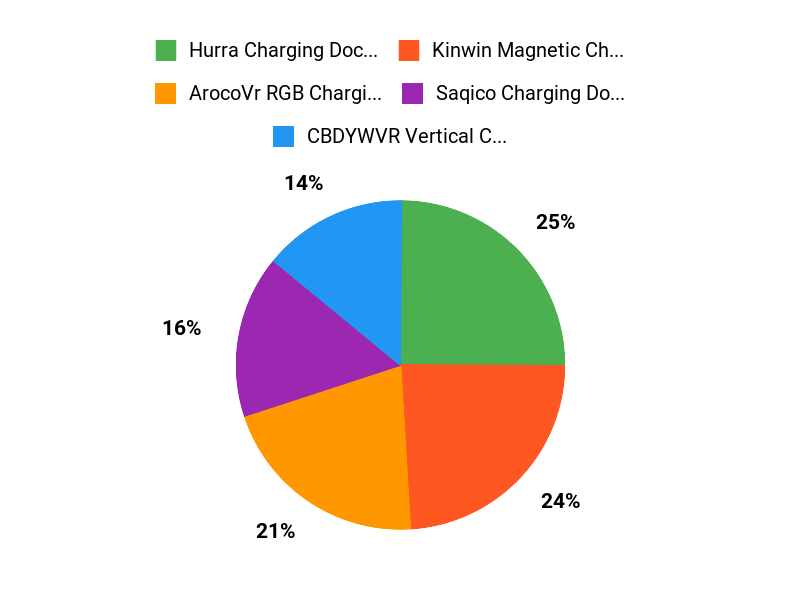
Choosing the right charging dock is about matching the dock to how you use your Quest 3. If you want a reliable, feature-rich station with solid user feedback, the Hurra dock stands out as the best overall pick. If price matters most, the Kinwin and CBDYWVR options give you good function for less money.
For the fastest PD-capable option, the ArocoVr model targets performance-minded users, while the Saqico dock balances a strong design and useful extras like magnetic controllers and RGB lighting. Consider compatibility with your headset model, whether included rechargeable batteries matter to you, and how important a compact, display-style dock is for your setup — that will point you to the best fit for your needs.
| Product | Image | Rating | Dimensions & Weight | Special Highlights |
|---|---|---|---|---|
| Charging Dock for Meta Quest 3/3S by Saqico |
 |
4.1/5 (109 reviews) | 2.36 x 4.41 x 15.39 inches, 1.5 pounds |
|
| Charging Dock for Meta Quest 3S/3 by Kinwin |
 |
4.2/5 (409 reviews) | 13.66 x 5.55 x 2.36 inches, 1.28 pounds |
|
| Hurra Charging Dock for Meta Quest 2 |
 |
4.5/5 (321 reviews) | 16.61 x 4.49 x 3.23 inches, 1.83 pounds |
|
| RGB Charging Dock for Meta Quest 3/3S by ArocoVr |
 |
N/A | 9.84 x 7.05 x 2.24 inches, 1.21 pounds |
|
| Charging Dock for MetaQuest 3S by CBDYWVR |
 |
4.3/5 (62 reviews) | 8.74 x 6.54 x 2.83 inches, 1.19 pounds |
|
This Roundup is reader-supported. When you click through links we may earn a referral commission on qualifying purchases.

