

You want a headset that works both untethered and as a serious PC VR device. The HTC Vive Focus Vision promises exactly that: standalone and PC VR versatility, mixed reality capabilities, and a high-resolution display.
This review helps you understand what it does well and where it falls short so you can decide whether it fits your needs and setup.
TL;DR
|
Feature |
Verdict |
|---|---|
|
Ease of Use |
⭐️⭐️⭐️⭐️ – Mostly intuitive interface and comfortable fit, but PC linking and some setup edge-cases can be fiddly ⏱️ |
|
Display & Visuals |
⭐️⭐️⭐️⭐️ – Total 5K resolution delivers crisp imagery; Fresnel lenses still introduce some glare and softer edges 🎨 |
|
Comfort & Build |
⭐️⭐️⭐️⭐️ – Well-balanced magnesium frame, rear battery and good ventilation make it comfortable for longer sessions 🪶 |
|
PCVR Connectivity & Reliability |
⭐️⭐️⭐️ – DisplayPort streaming opens high-quality PCVR, but wired/Wi‑Fi connections can be inconsistent for some users 🔌 |
|
Tracking & Mixed Reality |
⭐️⭐️⭐️⭐️ – Submillimeter camera tracking, built-in eye and hand tracking, and full‑body tracker support for advanced MR experiences 🔍 |
HTC Vive Focus Vision

If you like flexibility, the Vive Focus Vision is the kind of headset that makes switching between quick standalone sessions and full PC VR nights feel natural. You can grab it, play untethered, then plug into DisplayPort mode for lossless PC visuals when you want the higher-fidelity experience. The 5K-class display and 120° field of view give a noticeably sharper image, and features like auto-IPD and built-in eye/hand tracking make setup and interactions easier when multiple people share the headset.
In day-to-day use it’s great for short mixed-reality demos, a few rounds of Beat Saber or Pistol Whip, or checking email and productivity apps in VIVE Desk. For longer gaming sessions you’ll appreciate the balanced rear battery, cleanable cushions, top strap support and the extra cooling — it keeps the headset more comfortable during longer plays.
On special occasions, like showing friends MR experiences or using full-body trackers for active games, the Focus Vision handles those scenarios smoothly and feels more polished than many prior all-in-one units. There are trade-offs: the headset uses Fresnel lenses and an older Snapdragon XR2 Gen 1, so pancake-lens clarity and futureproof raw processing headroom aren’t its strengths. The standout parts are the flexible use modes, reliable display quality in DisplayPort mode, and the practical ergonomic touches.
If you want a premium, versatile VR headset that’s aimed at both mixed reality and PCVR without forcing you into a full tethered system, this is one to consider — especially if you value comfort and a straightforward user experience.
Pros and Cons
|
Pros |
Cons |
|---|---|
|
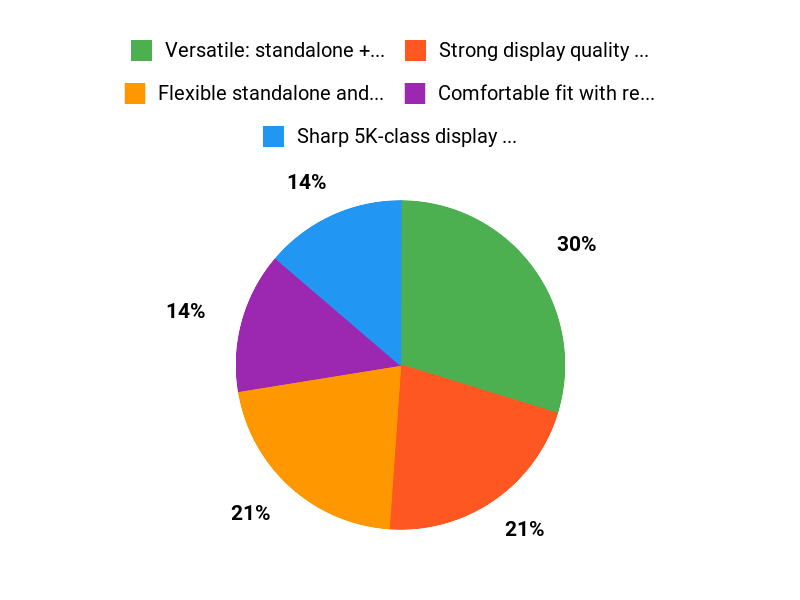
✅ Versatile: standalone + PC VR support |
❌ Fresnel lenses aren’t as sharp as pancake alternatives |
|
✅ Strong display quality and MR integration |
❌ Uses older Snapdragon XR2 Gen 1 chipset |
|
✅ Comfortable fit with rear battery balance |
❌ Some users report flaky wired PC connection behavior |
|
✅ Auto-IPD and built-in tracking improve usability |
❌ Standalone software library is more limited |
What People Say
People praise the display clarity in DisplayPort mode, the comfortable fit and the smooth mode switching. Criticism centers on lenses, chip age, and occasional PC connection quirks.
Overall Sentiment: Mixed

🗣️ Alex C.
You’ll notice the smooth switch between untethered and PC VR—users report DisplayPort mode gives clear, high-fidelity visuals. The headset is surprisingly comfortable for longer sessions thanks to the rear battery balance and adjustable straps, and the auto‑IPD makes sharing between people easier.
🗣️ Larry
You get a polished mixed-reality experience that feels lighter and more streamlined than older Vive models. Setup is straightforward, controllers are responsive, and the display comes across as crisper with good color and reduced motion blur compared to previous headsets.
Use Cases
|
Situation |
How It Helps |
|---|---|
|
Solo Gaming |
Use DisplayPort mode for lossless graphics and low latency, or go standalone for quick sessions without cables. |
|
Sharing With Friends |
Auto-IPD and easy fit adjustments make swapping users faster and reduce fiddly setup between sessions. |
|
Mixed Reality Productivity |
Scene understanding and VIVE Desk give you a spatial workspace for multitasking and creative work. |
|
Active Full‑Body Play |
Support for VIVE Ultimate Trackers and robust motion tracking makes full-body movement feel responsive. |
Ease Of Use
|
Feature |
Ease Level |
|---|---|
|
Initial Setup |
Moderate |
|
Switching Modes (Standalone ↔ PC) |
Easy |
|
Auto IPD & Fit Adjustments |
Easy |
|
Wired PC Connection |
Moderate |
Versatility
Very versatile — works as a true all-in-one for casual play and can be tied to a PC for higher-fidelity gaming or productivity. Accessory support expands what you can do over time.
Comfort
Comfortable for long sessions thanks to balanced weight, rear battery placement, adjustable headband and cleanable cushions; some glasses wearers may find padding a bit snug.
Problem Solving
Good at solving the ‘one device, many uses’ problem: it reduces the need for separate standalone and PC-only headsets, though some connection and lens issues remain.
Fun Factor
High for both casual and core VR games — the combination of good tracking, responsive controllers and solid visuals makes it enjoyable across genres.
Key Benefits
- Flexible standalone and PC VR use
- Sharp 5K-class display with wide FOV
- Auto-IPD, eye and hand tracking for easier setup
- Balanced ergonomics and improved cooling
- Support for full-body trackers and accessories
Rating: 3.3 (total: 60+)
FAQ
Is The Vive Focus Vision Better For Standalone MR Or PCVR?
You get a true hybrid: the headset is designed to work well as both a standalone mixed reality device and a PCVR headset. In standalone mode you benefit from the built‑in tracking, hand and eye sensors, and the freedom of not being tethered, while in PCVR mode the 5K resolution and DisplayPort streaming give you the sharpest visuals and access to the larger PC library.
Expect Wi‑Fi streaming to be convenient for casual use but less consistent than a wired DisplayPort connection; for the smoothest PCVR experience you should use the official or recommended DP/USB cable, keep GPU drivers and headset firmware up to date, and close heavy background apps on your PC. If you care most about the biggest content selection and absolute graphical fidelity, use PC mode; if you want simplicity and MR experiences without a PC, use standalone mode.
How Comfortable Is The Headset For Long Sessions And Will It Fit Glasses?
You’ll find the design leans toward comfort for extended play thanks to the rear dial, balanced battery placement, and a top strap that helps distribute weight, and the cushions are removable and cleanable so you can refresh the fit over time. It accommodates glasses for many users but some thicker frames may feel tight—try adjusting the dial and strap first or swapping to thinner frames or contact lenses if you can.
Be aware that the active cooling fan reduces heat buildup during long sessions but you will sometimes hear it; take regular breaks, keep the facial foam clean, and tweak strap tension until you hit the most comfortable fit.
What Common Issues Should You Expect And How Do You Troubleshoot Setup, Auto‑IPD, And Tracking?
You may see occasional hiccups like flaky DisplayPort detection, inconsistent auto‑IPD or eye tracking, and the usual mixed reality quirks with static menus or compatibility for some niche PCVR titles. First, update firmware and GPU drivers, use the recommended DisplayPort/USB cable and try different ports if the headset isn’t detected, and power cycle headset and PC in the sequence recommended by support if connections fail.
If auto‑IPD or language/menus act up, use the manual IPD controls and, as a last resort, run a factory reset (hold the battery and volume down as described in support) to restore defaults; recalibrate eye and hand tracking after any reset. For tracking problems, clean the headset cameras, ensure adequate room lighting, keep controllers charged and paired, and check for software updates or community troubleshooting threads for specific game compatibility.
Why Choose Vive Focus
You choose the Vive Focus Vision because it delivers flagship visuals and advanced tracking in a comfortable, all‑in‑one headset that feels polished and reliable from the moment you put it on. If you want high‑fidelity immersion for gaming or dependable performance for work, you get long battery life, a premium build and a growing content ecosystem that makes it easy to jump in and stay productive.
Wrapping Up
The Vive Focus Vision aims to be a true hybrid: high-resolution MR and solid PCVR capability packaged in a comfortable, well-balanced headset. If you value versatility, strong tracking, and long-session comfort, it will likely meet your needs. However, expect some setup friction and occasional connectivity or auto-IPD inconsistencies; early user feedback is mixed and the average rating sits around 3.3/5.
In short, it’s a powerful and promising headset for enthusiasts who want standalone MR plus PCVR, but not the flawless, out-of-the-box experience some rivals deliver.
Some Roundups users participate in affiliate programs including the Amazon Services LLC Associates Program, or Impact, affiliate advertising programs designed to provide a means for creators to earn fees by linking to websites. Participating users may earn a referral commission from qualifying purchases.

