

You want a VR headset that matches how you play, work, or relax. VR can transform entertainment, fitness, and productivity by putting you inside the experience instead of watching it from the outside.
In this guide you’ll find a practical comparison of the top 5 headsets so you can quickly see which one fits your priorities — whether that is mixed reality versatility, top-tier visuals, PC gaming fidelity, or cinematic portability.
Top Picks
|
Category |
Product |
Price |
Score |
|---|---|---|---|
|
🏆 Best Overall |
$499.99 |
95/100 |
|
|
⚡ Best for Console Performance |
$514.69 |
88/100 |
|
|
🚀 Most Advanced for PC Sim Racing & Flight |
$719.99 |
78/100 |
|
|
🔊 Best for Personal Cinema |
$1,199.00 |
70/100 |
|
|
💡 Best Hybrid (Standalone + PCVR) |
$999.00 |
75/100 |
How We Chose the Top VR Headsets
You want a headset that actually works for how you’ll use it, so we compared models across several practical measures. We looked at display quality and resolution so visuals feel convincing; tracking accuracy and controller ergonomics so interaction feels natural; comfort and weight for longer sessions; platform and library because the games and apps are what keep you coming back; battery life and standalone capabilities for portability; PC compatibility and required GPU power for high-end simulated experiences; and value — the balance between what you pay and what you actually get.
We also considered real user feedback to spot recurring strengths and pain points. The result is a mix of standalone all-rounders, console-first options, and PC-focused headsets so you can match the headset to your priorities.
Meta Quest 3 512GB

If you’re curious about stepping up your VR game, the Meta Quest 3 makes it easy to see why people are excited. You get noticeably sharper visuals and a wider field of view that make games and movies feel more immersive, and the mixed reality features let you blend virtual content into your real space — handy for quick demos or trying out an app without clearing the room.
It’s a true standalone headset, so you can use it for daily things like watching shows on a giant virtual screen, quick fitness sessions, or jumping into a game, and it also works well for special occasions like bringing VR to a party or using a virtual office for focused work. The headset is lightweight and feels balanced, though some people swap the stock strap for an Elite option if they want extra comfort or battery life.
Overall, if you want a polished, versatile MR experience that’s easy to pick up and use, this is one that will likely fit into regular life rather than just collecting dust on a shelf.
What People Say
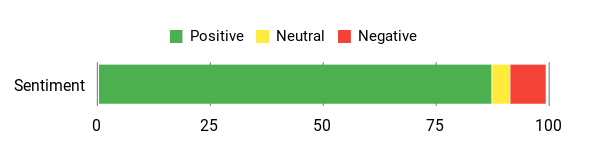
Users praise the improved graphics, mixed reality fun, and the ability to run older Steam VR titles via Virtual Desktop, while noting the strap and battery as common tweaks.
Overall Sentiment: Positive
🗣️ Justin Brown
Justin Brown highlights the mixed reality experience as a standout — he calls it ‘incredible’ and says the device is sleek, light, and easy to handle. He also points out that via Virtual Desktop he can keep playing his Steam VR library, which is a big plus if you don’t want to lose older purchases.
🗣️ Daryl V
Daryl V gives a detailed look at real improvements: the pancake lenses and higher resolution make finding a ‘sweet spot’ a thing of the past, visuals feel much sharper, and the headset’s weight distribution lets you play longer; he does note battery life is limited, but praises the overall performance and comfort.
Use Cases
|
Situation |
How It Helps |
|---|---|
|
Gaming |
You get sharper visuals and better tracking so games feel more believable, and the standalone setup means you can jump in anywhere without extra hardware. |
|
Fitness |
Fitness apps look great and the headset’s light feel makes workouts less fatiguing; guided sessions turn your living room into a mini studio. |
|
Work & Productivity |
Use virtual screens and a remote desktop to create an immersive workspace — handy for focused tasks without distractions. |
|
Social & Parties |
Mixed reality demos and shared experiences let you show off apps and games to friends without needing a complicated setup. |
Versatility
Very versatile — it handles games, media, fitness, and productivity well, and switching between those uses is simple since it’s a standalone headset.
Comfort
Generally comfortable thanks to improved weight distribution and a slim profile; some users still replace the stock strap for a fit that suits longer sessions.
Fun Factor
High — the mixed reality features and the visual upgrades make experiences feel more convincing, whether you’re exploring a game or watching a movie on a virtual big screen.
Travel Friendliness
Good for travel because it’s wireless and self-contained; bring a compact case and a charger and you can use it on planes or in hotel rooms.
Speed & Response Time
Snappy in everyday use — apps load quickly and interactions feel responsive, so you won’t be waiting around between experiences.
Why You’ll Like It
- Crisp, immersive visuals and wider field of view
- Mixed reality that blends virtual objects into your room
- Large 512GB storage for a big library of apps and games
- Standalone convenience — no PC or console required
- Lightweight design that’s easier to wear for longer sessions
Rating: 4.5 (total: 5065+)
PlayStation VR2 (Horizon Bundle)

If you already have a PS5 and want richer, console-driven VR, the PSVR2 brings noticeably sharper visuals, 3D audio and eye-tracking that make game worlds feel more alive. You’ll appreciate how simple it is to set up on PlayStation — plug in, follow a few prompts and you’re in. It’s great for everyday uses like watching VR videos on a huge virtual screen or squeezing in a quick session of Beat Saber, and it really shines for special occasions: showing friends Horizon Call of the Mountain’s vistas, trying a racing sim like Gran Turismo in immersive mode, or using it for a VR demo at a get-together.
The Sense controllers and haptic feedback add a tactile layer that pulls you into climbing, archery and close-up interactions. If you want a polished, console-first VR headset that’s easy to pick up and gives you standout visuals and immersive audio, the PSVR2 is worth considering.
What People Say
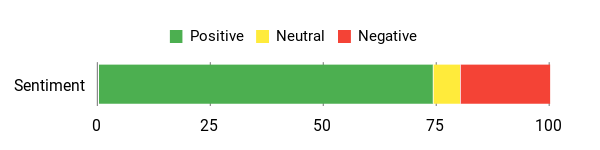
People praise the visual fidelity, immersive audio and near-effortless PlayStation setup, while noting occasional tracking hiccups and that some users experience motion sensitivity.
Overall Sentiment: Positive
🗣️ Julio Anzaldo
Julio Anzaldo gives a detailed run-down: he found the headset comfortable for a few hours, praised the growing game library, and called setup on PlayStation almost zero-effort. He highlights the graphics — crisp visuals and consistent 120 fps in games he played — and mentions only occasional controller tracking hiccups.
🗣️ Bo
Bo compares PSVR2 to standalone competitors and found setup straightforward and the VR experience ‘just wow’—especially in Gran Turismo 7—while noting the build feels lightweight and solid; he also shares a practical tip to reset a controller if it stops responding.
Use Cases
|
Situation |
How It Helps |
|---|---|
|
Console Gaming |
You get high-resolution visuals and low-latency performance tied to the PS5, so single-player adventures and racing sims feel more immediate and immersive. |
|
Showing Friends |
The Horizon bundle’s cinematic moments and visceral activities like climbing or archery make for easy, impressive demos when you want to share VR with others. |
|
Quick Sessions |
Because setup on PlayStation is simple, you can hop in for a short game or VR video without a long configuration process. |
|
Sim Racing & Driving |
High frame rates and clear visuals enhance depth perception and track detail, improving immersion during laps or longer races. |
Versatility
Very versatile within the console ecosystem — it’s primarily aimed at gaming but also handles media and demo-style experiences well, though it’s not designed as a standalone device.
Comfort
Comfortable for many users thanks to balanced weight and an adjustable headband; some people still tweak the fit or add accessories for longer marathon sessions.
Fun Factor
High — the Sense controllers, haptics and crisp visuals make interactive moments feel satisfying whether you’re climbing, shooting a bow or simply exploring a scenic world.
Travel Friendliness
Moderate — it’s not standalone, so you need a PS5 to get the full experience; if you travel with your console it’s doable, otherwise standalone headsets are easier on the road.
Speed & Response Time
Responsive in typical use with smooth frame rates in many titles; occasional rare tracking hiccups have been reported but overall interactions feel snappy.
Why You’ll Like It
- High-quality OLED visuals with 4K HDR rendering for crisp imagery
- PS VR2 Sense tech: eye tracking, headset feedback and 3D audio
- Intuitive Sense controllers with haptic feedback and adaptive triggers
- Very easy setup when used with a PS5 — near plug-and-play
- Comfortable for typical sessions and solid weight distribution
Rating: 4.0 (total: 1567+)
Pimax Crystal Light Prime

If you care about sharp visuals and a wide view, this headset will probably catch your eye. You get QLED panels with very high per‑pixel clarity and a noticeably larger field of view than most headsets, which makes sims and panoramic scenes feel much more immersive.
In everyday use you can watch VR videos, jump into Beat Saber or play a quick sim session and enjoy clearer details and fewer visible screen‑door artifacts. For special sessions — showing friends a flight over cities or diving into a long sim race — the broad FOV and strong clarity really sell the experience.
Be aware it’s a PC‑centric headset: you’ll want a mid‑to‑high‑end GPU and to spend a little time tuning PiTool/SteamVR for best results. There are trade‑offs — some users mention a tighter sweet spot, occasional tracking or fit quirks, and Pimax’s optional accessories (like Lighthouse tracking faceplates or upgraded cushions) can improve comfort and tracking if you need them.
If you want an immersive, clarity‑forward PCVR headset and are comfortable tweaking settings and hardware, this one’s worth a close look.
What People Say
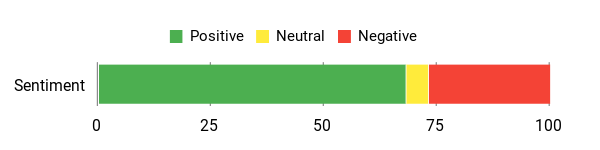
Users praise the clarity and massive field of view — many call the visual step up worth the effort — while noting you’ll likely need a capable PC and may want accessory upgrades for the best fit and tracking.
Overall Sentiment: Positive
🗣️ Thomas W.
Thomas W. says the upgrade was dramatic: the huge FOV and reduced screen‑door effect make visuals feel stunning, and it even supports higher refresh rates. He notes you’ll want at least a GTX 1070‑class GPU for the best experience, and that PiTool is straightforward to use for tuning.
🗣️ fmjgdk001
fmjgdk001 reports excellent immersion thanks to the very wide field of view and high detail from the LCD/QLED panels. They call the FOV a game changer, praise the much less obvious screen‑door effect, and say color is a bit muted but fixable via software tweaks; they also mention some driver quirks and that top settings require a powerful PC.
Use Cases
|
Situation |
How It Helps |
|---|---|
|
Flight sims |
The expanded FOV and detailed displays make instrument panels and distant scenery much clearer, helping you spot terrain and read gauges without constantly squinting. |
|
Sim racing |
A roomy view and sharp resolution improve peripheral awareness and track detail, making turns and braking feel more intuitive. |
|
Watching VR media |
High pixel density and local dimming give videos and space/landscape scenes more depth and less visible pixel grid, so cinematic content looks cleaner. |
|
Demo sessions with friends |
Big, impressive vistas and clearer visuals sell the wow factor quickly, so short demos feel more memorable. |
Versatility
Primarily a PCVR headset — it works well across genres from sims to rhythm games via SteamVR and supports optional tracking/controller ecosystems, but it isn’t a standalone travel device.
Comfort
Generally light and balanced, so many people find it comfortable for typical sessions; some users swap straps or face cushions if they plan very long playtimes or need better seal/pressure distribution.
Fun Factor
High — the combination of wide FOV and crisp panels makes exploration, sims and panoramic experiences feel more immersive than many rivals.
Travel Friendliness
Low — it’s tethered to a PC and benefits from optional accessories for tracking, so it’s less convenient for quick trips compared with standalone headsets.
Speed & Response Time
Responsive when paired with a capable GPU; some users report occasional tracking blips or setup quirks, but interactions feel snappy once PiTool and SteamVR are tuned.
Why You’ll Like It
- Very high per‑eye resolution with QLED panels for crisp detail
- Wide field of view that increases immersion in sims and open environments
- Lightweight build and balanced fit for many typical sessions
- Upscale mode to boost framerates while preserving visual quality
- Optional Lighthouse faceplate and broad controller compatibility for SteamVR setups
Rating: 3.8 (total: 138+)
GOOVIS G3 Max

If you want a personal big-screen experience without a full home theater, the G3 Max is worth a look. You get dual micro‑OLED panels that deliver very dark blacks and crisp detail, and the headset accepts both HDMI and USB‑C so you can plug in a laptop, console or a handheld like a Steam Deck.
In daily use it’s great for late‑night movies, streaming from Plex or watching 3D content, and it’s handy if you want a private screen while traveling or lounging in bed. For gaming it feels responsive and sharp on capable sources, and the lightweight, detachable head strap plus the ability to mount it on an arm make longer sessions easier.
There are tradeoffs — some users report fit or headstrap issues and a few ran into startup problems — but if you value picture quality, portability and broad device compatibility, this headset can be a solid personal theater option.
What People Say
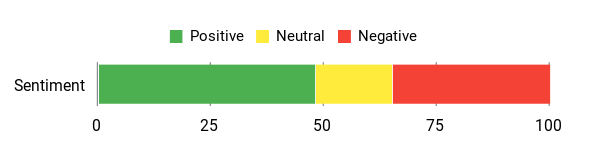
People consistently praise the image quality and portability — many treat it as a personal theater for movies and gaming. Common complaints focus on fit, strap availability and a few isolated reliability/support issues.
Overall Sentiment: Mixed
🗣️ Juan Vargas
Juan Vargas praises the G3 Max for feeling premium from the packaging to the build, and says he uses it a lot with a Steam Deck and PlayStation — calls it a great travel companion and recommends it for on‑the‑go viewing.
🗣️ Luke
Luke (A Gamer’s Favorite) highlights the image quality: the dual 2.5K micro‑OLEDs deliver sharp visuals and perfect blacks. He reports no lag when gaming, pairs it with an Xbox, and likes the lightweight, adjustable fit — even mounting it on an arm for long sessions.
Use Cases
|
Situation |
How It Helps |
|---|---|
|
Watching movies late at night |
You get a private, high‑contrast screen that keeps the living room dark for others while giving you a cinematic feel right in bed. |
|
Console and PC gaming |
Low perceived lag and sharp OLED visuals make fast action and detailed scenes clearer, especially when paired with a capable source. |
|
Travel and hotel stays |
Compact connectors and a portable headset mean you can recreate a big‑screen experience without hauling a TV. |
|
Watching 3D or Plex libraries |
Good contrast and resolution improve depth and detail in 3D files and personal media collections, making older content feel fresher. |
Versatility
Quite versatile for a wired headset — it handles consoles, phones/tablets with USB‑C and PC sources. It’s not a standalone wireless system, so expect to carry the cables or a compatible source.
Comfort
Many users find it comfortable thanks to a balanced design and detachable strap, but a noticeable minority report fit quirks or wish for a sturdier rear headband for long sessions.
Fun Factor
High for solo cinema sessions and portable gaming — the sharp OLEDs and 3D support make movies and immersive content feel special.
Travel Friendliness
Good — the compact form and USB‑C/HDMI connectivity make it a sensible choice for travel, though you’ll want the strap and any mounting accessories packed too.
Speed & Response Time
Generally responsive with modern sources; reviewers report smooth gameplay and minimal lag when connected correctly, though a few users experienced setup or signal issues in isolated cases.
Why You’ll Like It
- OLED panels with deep blacks and high pixel density for clearer, cinema‑like images
- Works with HDMI and USB‑C — connects to consoles, PCs and many handhelds
- Portable design that’s easy to use in bed, on a plane or mounted to an arm
- Supports 3D playback and a range of common video apps and devices
- Detachable strap and flip‑up design for easier wear and quick breaks
Rating: 3.3 (total: 16+)
HTC Vive Focus Vision
If you want a headset that can do both standalone mixed reality and proper PC VR without feeling like a compromise, the Focus Vision is worth a look. You get a sharp 5K display, built-in eye and hand tracking, and a passthrough depth sensor that makes MR interactions feel more natural than a simple camera overlay.
In day-to-day use it’s great for room-scale play, social VR sessions, or dropping into a quick VIVEPORT experience. For bigger gaming nights or sim setups you can switch into DisplayPort mode and stream lossless visuals from your PC. The fit is thoughtful — rear battery placement balances the weight and there’s an adjustable dial so you can fine-tune comfort for longer sessions.
Practical touches like a hot-swappable front battery, removable cushions, and a fan to keep things cool make it easier to use repeatedly. There are trade-offs — some users prefer pancake lenses over Fresnel optics, and a few setups report PC connection quirks — but if you want a flexible headset that blends mixed reality, standalone play and solid PCVR performance, this one is a strong, versatile option you can actually use for work, social apps, or immersive gaming.
What People Say
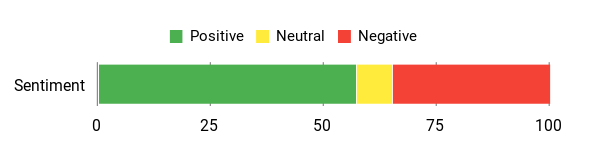
You’ll hear a lot of praise for the display quality, the comfort from the rear battery balance, and how well it handles both standalone MR and PCVR. Common gripes focus on Fresnel lenses, occasional DisplayPort/connectivity hiccups, and a leaner standalone app library.
Overall Sentiment: Mixed
🗣️ Alex C.
Alex C. says switching between untethered and PC modes is smooth and that PCVR performance is excellent when using the DisplayPort converter. He also highlights comfort thanks to balanced weight and automatic IPD adjustment that helps when multiple people share the headset.
🗣️ Larry
Larry notes the Focus Vision feels lighter and more streamlined than previous models, with intuitive setup and responsive controllers. He found the mixed reality to be polished and appreciated the crisper display and reduced motion blur in VR sessions.
Use Cases
|
Situation |
How It Helps |
|---|---|
|
PC VR gaming |
DisplayPort mode delivers lossless visuals, so you get the sharpest image and lowest latency when you want full PC power behind your headset. |
|
Mixed reality demos or productivity |
The depth sensor and passthrough cameras let virtual objects interact with your real space, so you can test MR apps, visualize 3D models, or use spatial tools like a virtual desk. |
|
Local multiplayer or shared use |
Auto‑IPD and an adjustable rear dial mean faster, easier adjustments between different users, which keeps handoffs smooth at gatherings. |
|
Long sessions and endurance play |
Balanced weight from the rear battery, removable cushions, and a cooling fan reduce pressure and heat, making longer sessions more comfortable. |
Versatility
Very versatile — it’s a true hybrid that works standalone for quick MR or VIVEPORT experiences and connects to a PC for full‑fidelity VR when you want it.
Comfort
Most users report comfortable fit thanks to rear battery balance and an adjustable dial; glasses can fit but some found the face pads a bit tight depending on frame shape.
Fun Factor
High when you want immersive MR or PCVR sessions — the sharp display and responsive tracking make games and social apps feel engaging.
Travel Friendliness
Moderate — it’s heavier than ultra‑compact headsets and is designed more for home use, but detachable cushions and a removable front battery make it manageable for short trips.
Speed & Response Time
Generally responsive in both standalone and DisplayPort PC modes; some reviewers experienced intermittent PC connectivity issues that required reconnection steps.
Why You’ll Like It
- 5K total resolution and up to 120° field of view for noticeably sharper visuals
- Works standalone or in DisplayPort PC mode so you can jump between casual and hardcore sessions
- Auto‑IPD and eye tracking that simplify setup and improve clarity for different users
- Hot‑swappable front battery and balanced rear battery design for longer, more comfortable sessions
- Depth sensor and passthrough cameras for more realistic mixed reality interactions
Rating: 3.3 (total: 60+)
FAQ
How Do I Choose Between Standalone, Console, And PC VR?
You should pick the type that matches how and where you want to use VR. If you value portability and simple setup so you can play in different rooms or take it with you, a standalone like the Meta Quest 3 offers mixed reality, onboard apps and easy wireless streaming to a PC when you want more power.
If you already own a PS5 and want console-grade visuals and haptic feedback, the PlayStation VR2 is optimized for that ecosystem and gives very polished, high‑fidelity experiences. If you chase the absolute highest resolution, widest field of view and simulator-level immersion, headsets like the Pimax Crystal or the HTC Vive Focus Vision (which also supports PC streaming and standalone modes) deliver that—but you should be prepared for a powerful PC, extra setup and occasional fiddling.
Devices like the GOOVIS G3 Max focus on cinematic, wired viewing rather than full room‑scale interaction. The practical things to check before you buy are whether your PC or console is compatible, how much play area you have, whether you want built-in mixed reality passthrough, and how much weight and strap comfort you can tolerate; try headsets in a store if you can so you can judge comfort and tracking for yourself.
Will I Experience Motion Sickness And How Can I Prevent It?
Motion sickness is common but often manageable. It usually comes from low frame rates, latency, extreme FOV or locomotion that doesn’t match your body.
To reduce it, start slow and calibrate your IPD, play short sessions and increase time gradually, use the headset’s comfort/motion smoothing settings, keep the headset lenses clean and properly seated, and prefer seated or teleport locomotion modes while you adapt. High‑refresh headsets with stable tracking—like the PSVR2 or a well‑configured Meta Quest 3—tend to make you feel better faster, while ultra‑wide FOV or very heavy setups (some high‑res PC headsets) can worsen symptoms until you acclimate.
Also check that your PC or streaming link maintains a steady high framerate; wired connections or a strong Wi‑Fi 6 link for streaming reduce latency. If you still feel unwell, take longer breaks and consider consulting your doctor about motion‑sickness remedies.
What Accessories And Setup Steps Give The Best Real‑World Experience?
Focus on fit, tracking and connectivity. A better head strap or an ergonomic counter‑weight strap dramatically improves comfort for longer sessions, and a replaceable facial interface or wipeable cover helps hygiene if multiple people use the headset.
If you plan to use PCVR, buy a high‑quality USB‑C or DisplayPort cable and make sure your GPU and ports match the headset’s requirements; some headsets need official adapters or firmware updates to work reliably. For brighter mixed reality or long standalone sessions, a battery strap or external charger helps, and prescription lens inserts save a lot of hassle if you wear glasses. Calibrate IPD and guardian/play‑area boundaries before you start, keep firmware and companion apps up to date, and store large libraries on headsets with ample internal storage or use cloud/sideloading workflows. If you run into tracking or pairing issues, a quick factory reset or re‑pair following the manufacturer guide usually fixes it; for PC headsets, make sure companion software (for example PiTool for Pimax) is running and that SteamVR settings match the headset profile.
Small setup steps like these deliver the biggest, most reliable improvements in everyday use.
What Customers Prefer
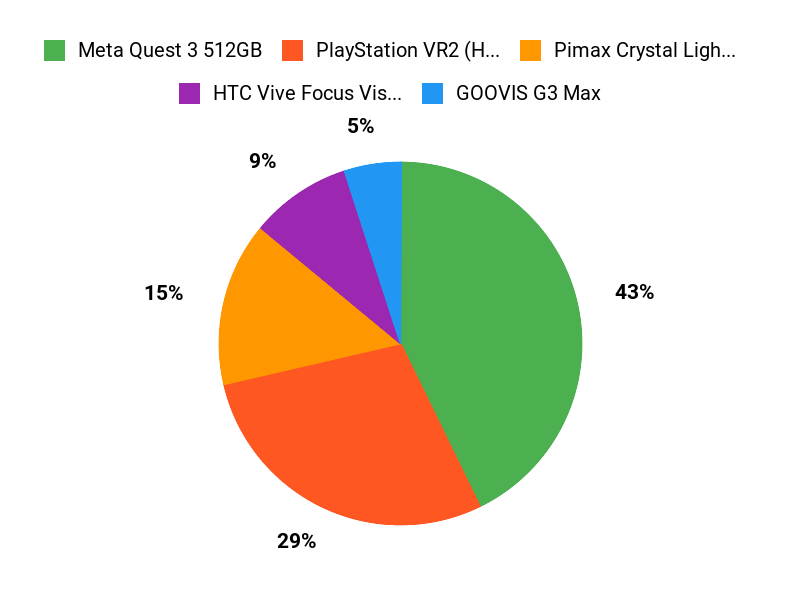
When choosing among the Meta Quest 3 512GB, PS VR2 (Horizon Bundle), and Pimax Crystal Light Prime, you mainly decide whether you want standalone convenience and lots of onboard storage (Quest 3), console-driven exclusive games and polished haptics/eye-tracking (PS VR2), or ultimate visual fidelity and a wide field of view for PC VR (Pimax). You’ll also weigh comfort, ease of setup, and whether you have the console/PC power and budget to get the experience each headset is built for.
Wrapping Up
If you value a flexible, easy-to-use system for games, fitness, and mixed reality, then the Meta Quest 3 512GB is the most balanced pick thanks to its high-resolution display, pancake lenses, and large onboard storage. If you already own a PS5 and want the best console visuals and exclusive immersive titles, choose the PlayStation VR2. For serious PC sim racers and flight sim fans who prioritize field of view and resolution, the Pimax line offers standout clarity at the cost of needing a powerful PC.
If your main goal is a private cinematic experience, the GOOVIS G3 Max targets that niche. And if you want a headset that can bridge standalone MR and PCVR workflows, consider the HTC Vive Focus Vision. Use the criteria above to match the headset to your use case so you get the experience you care about most.
| Product | Image | Rating | Resolution | Battery Life | Weight |
|---|---|---|---|---|---|
| Meta Quest 3 512GB |
 |
4.5/5 (5,065 reviews) | 2064 x 2208 pixels | Approximately 2.2 hours | 3.08 pounds |
| PlayStation VR2 Horizon Call of The Mountain™ Bundle |
 |
4.0/5 (1,567 reviews) | 2000 x 2040 pixels per eye | N/A (Wired) | 5.19 pounds |
| Pimax Crystal Light Prime PCVR Headset |
 |
3.8/5 (N/A reviews) | 8K | N/A (Wired) | N/A |
| GOOVIS G3 Max |
 |
3.3/5 (16 reviews) | 3840 x 2160 pixels | N/A (Wired) | 3.25 pounds |
| HTC Vive Focus Vision |
 |
3.3/5 (60 reviews) | 5K | N/A (Wired) | 4.66 pounds |
Some Roundups users participate in affiliate programs including the Amazon Services LLC Associates Program, or Impact, affiliate advertising programs designed to provide a means for creators to earn fees by linking to websites. Participating users may earn a referral commission from qualifying purchases.

